AI Content Workflow for Creators: From Idea to Published Content
A practical, step-by-step workflow showing exactly where AI fits in content production, from idea and research to scripting, editing, repurposing, publishing and review, with human checkpoints at each stage.
Most creators use AI in bursts: a caption here, a title idea there. A workflow is more useful. It decides in advance which steps AI handles, which steps are always human, and where you check the output before it goes anywhere.
For choosing tools and the risks involved, see AI tools for creators. This article is the production process.
Quick answer
An AI content workflow has eight stages: idea, research, outline and script, production, editing, captions and translation, repurposing, and publishing and review. Use AI to generate options, summarise research, draft outlines, speed up rough edits, create captions and translations, and repurpose long content into short pieces. Put a human checkpoint after each AI step: choose the idea, verify facts, rewrite the script in your voice, approve the edit, proofread captions, and decide disclosure before publishing.
The eight-stage workflow
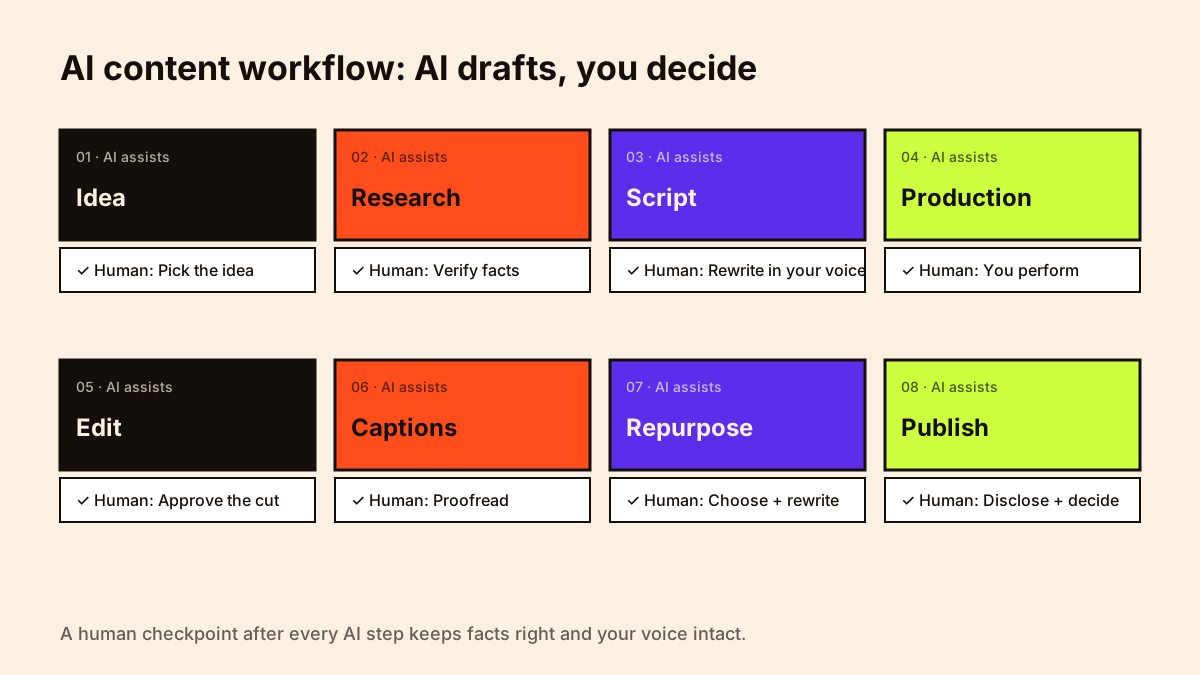
| Stage | AI does | Human checkpoint |
|---|---|---|
| 1. Idea | Lists angles from your comments, search questions and past top videos | You pick the idea you have a real opinion on |
| 2. Research | Summarises sources you provide; drafts a fact list | You verify every fact against primary sources |
| 3. Outline and script | Structures points; suggests hooks and transitions | You rewrite in your voice; add personal stories |
| 4. Production | Teleprompter text, shot list, checklist | You perform; nothing replaces your delivery |
| 5. Editing | Rough cut, silence removal, reframing, audio cleanup | You set pacing and approve the final cut |
| 6. Captions and translation | Subtitles, translated captions, descriptions | You proofread names, numbers and meaning |
| 7. Repurposing | Clips, carousel text, newsletter draft, show notes | You choose what's worth reposting and rewrite |
| 8. Publish and review | Title variations, description drafts, analytics summary | You decide disclosure, final title and next steps |
Stage notes and example prompts
Idea
"Here are the 30 most common questions from my comments this month [paste]. Group them into themes and suggest 10 video angles for first-time investors in India. Don't invent statistics."
Research
"Summarise these three official pages [paste or attach] into a fact list with the source for each fact. Flag anything that is ambiguous or may have changed recently."
Script
"Using my notes below, create a 60-second structure: hook, three points, one example, call to action. Keep my phrases where possible. Write in Hinglish like my notes."
Then: rewrite it yourself, out loud, the way you'd actually say it.
Repurposing
"From this transcript [paste], suggest five 30-second clip moments with timestamps, a 6-slide carousel outline, and a 300-word newsletter summary. Quote me exactly; don't add claims."
Disclosure checkpoint
- Did AI create or meaningfully alter realistic visuals, audio or scenes? Disclose on YouTube and in line with India's 2026 IT Rules labelling requirements.
- Did AI only help with captions, colour, cleanup or scripting? Generally no disclosure needed on YouTube.
- Is this sponsored? Check the brand's position on AI elements and label the partnership as usual.
YouTube's rules are on its altered or synthetic content page.
A weekly AI-assisted schedule
MONDAY — Ideas + research (AI summaries → you verify)
TUESDAY — Script (AI outline → you rewrite); shot list
WEDNESDAY — Shoot
THURSDAY — AI rough cut + audio cleanup → you edit
FRIDAY — Captions, translations (AI → you proofread); thumbnail drafts → you finalise
SATURDAY — Publish; AI drafts clips, carousel, newsletter → you choose and rewrite
SUNDAY — AI summary of last week's analytics → you decide next week's focus
Combine this with the brand-deal side of your week in the creator workflow, and track results in your creator analytics dashboard.
Quality control checklist
- Every fact checked against a primary source
- Script rewritten in my own words
- Personal story or opinion included
- Names, prices and numbers in captions proofread
- Translation reviewed by a fluent speaker
- Music, images and voices cleared for commercial use
- AI disclosure decided
- Sponsored content labelled
Research, scripts and content planning with AI
Three stages benefit most from AI when you keep the judgement yourself. Research: ask for summaries and questions to investigate, then verify every fact at the source. Scripts: generate hook options and outlines from your own notes, then write and say the script in your own words. Planning: turn a list of audience questions into a month of content ideas grouped by series, then choose what fits your capacity and positioning.
"Here are 20 questions my audience asked this month: [list]. Group them into 3–4 series for a [niche] creator posting [X] times a week. For each, suggest one short-form and one long-form idea. Flag anything that needs fact-checking."
Then: pick, reorder and rewrite; check facts; add to your content calendar
For AI in the business side of brand work, see AI for brand collaborations; for labelling AI content, see AI disclosure for creators.
Agent features that carry out multi-step tasks, such as research packs, need tighter limits than chat assistants; see AI agents for creators.
Mistakes to avoid
- Skipping checkpoints when you're busy; errors compound through repurposing.
- Letting AI choose topics you don't care about.
- Publishing auto-translated captions unchecked.
- Repurposing the same clip everywhere without adapting it to each platform.
- Pasting confidential brand briefs into tools without permission.
For the non-AI parts of production, see content batching and content repurposing for creators.
Conclusion
A good AI workflow gives you back time without taking away your voice. Decide which stages AI handles, keep a human checkpoint after each, and review the process monthly: keep what saves time and improves quality, drop what doesn't.