Creator Workflow: How to Manage Brand Deals, Content and Deadlines Like a Business
A practical operating system for creators juggling several brand deals: six stages from enquiry to payment, a weekly routine, and a campaign tracker you can download and start using today.
One brand deal fits in your head. Four at once, with different briefs, approval contacts, posting dates and invoices, does not. The creators brands rebook are rarely the most talented; they're the ones who never miss a deadline, never lose a brief and always send the report. That's a workflow, not a personality trait.
Quick answer
A creator workflow is a repeatable system for moving each brand deal through six stages: opportunity (log and qualify enquiries), planning (brief, deliverables, deadlines, approvals), production (scripts, shoots, edits, assets), approval and publishing (revisions, final approval, posting with disclosure), reporting (screenshots, analytics, campaign report) and finance (invoice, payment, tax records). Keep every deal in one tracker, review it weekly, and work backwards from posting dates.
The six stages
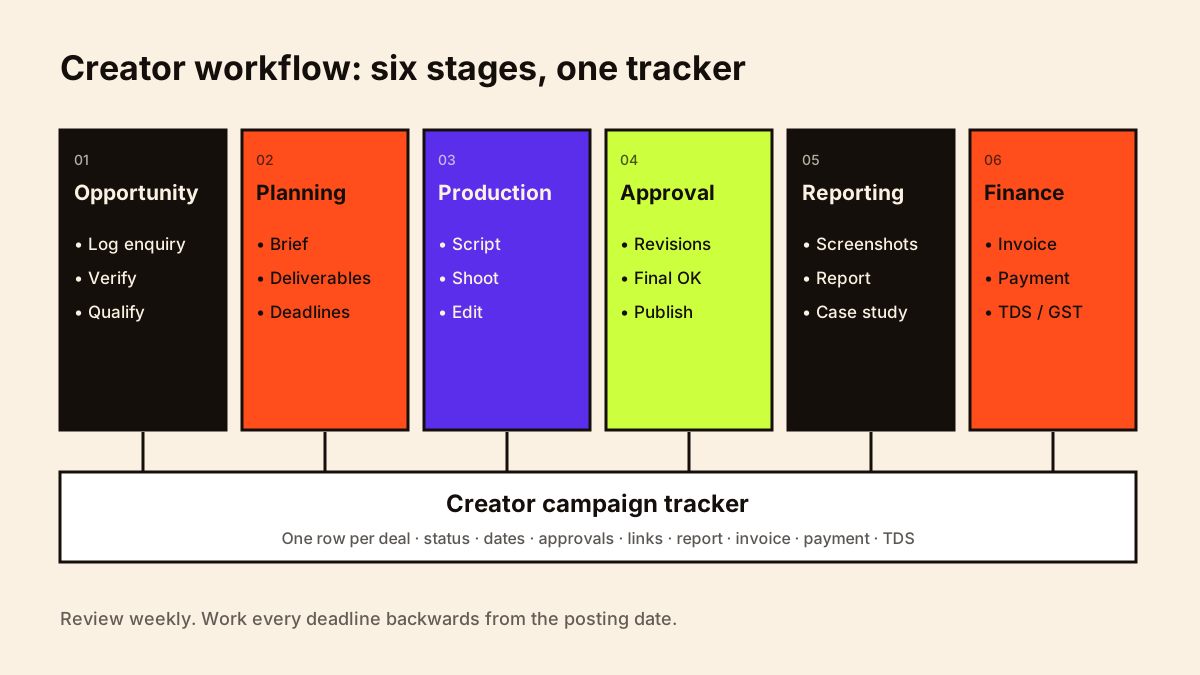
1. Opportunity: track inbound enquiries
- Log every enquiry the day it arrives: brand, contact, channel, what they asked for.
- Verify legitimacy before replying in detail. See how to spot fake brand collaboration offers.
- Qualify: audience fit, budget, timing, conflicts with existing exclusivity.
- Reply within one or two working days.
2. Planning: brief, deliverables, deadlines, approvals
- Save the brief and your questions and answers in one folder per campaign.
- List each deliverable with its format, platform and length.
- Work backwards from the posting date: report ← post ← final approval ← draft ← shoot ← script ← product receipt.
- Record who approves, how many rounds, and their feedback deadline.
- Confirm payment terms and invoice requirements now, not later.
3. Production: scripts, shoots, edits, assets
- Batch similar work: script several campaigns on one day, shoot on another.
- Keep a shot list with mandatory product shots, disclosure frames and on-screen text.
- Name files consistently: brand_campaign_deliverable_v1.
- Back up raw footage until usage periods end.
For where AI can speed up scripting, editing and repurposing without losing your voice, see the AI content workflow for creators.
4. Approval and publishing
- Send drafts with a clear note: what's included, what feedback you need, and by when.
- Track revision rounds against the agreed limit. See how to handle brand revisions.
- Before posting: disclosure label, platform partnership tool, tags, links, codes, caption approved.
- After posting: test links, send live URLs to the brand the same day.
5. Reporting
- Set a calendar reminder for the report date (often 7 days after posting).
- Take native-insights screenshots with dates visible.
- Send a short report compared with your averages. See creator analytics for brand deals.
- Turn strong results into a case study.
6. Finance
- Invoice on the trigger in your contract (signing, posting) with the right entity and PO.
- Record due dates and follow up on the day payment is due.
- Log TDS deducted and certificates received.
- Keep GST records if you're registered.
- Track gifted products and business expenses.
What to track and how to keep records is covered in creator business expenses.
Guides for each finance step: how to invoice brands as a creator, creator payment terms, TDS for creators and GST for creators.
The creator campaign tracker
One row per deal, one column per thing you need to know. A spreadsheet is enough; you can move to a CRM or project tool later. Download the creator campaign tracker (CSV) and open it in Google Sheets, Excel or Numbers.
| Column group | Columns |
|---|---|
| Opportunity | Brand · Agency · Contact · Channel · Date received · Verified? · Status |
| Scope | Deliverables · Platforms · Usage · Exclusivity · Fee · Payment terms |
| Dates | Product received · Script due · Draft due · Feedback due · Post date · Report due |
| Approval | Revision rounds allowed · Rounds used · Final approval date |
| Publishing | Live links · Disclosure done · Links tested |
| Reporting | Report sent · Key results · Case study? |
| Finance | Invoice no. · Invoice date · Due date · Amount · GST · TDS · Paid date · Certificate received |
Suggested statuses: New enquiry → Qualifying → Proposal sent → Negotiating → Confirmed → In production → Awaiting approval → Scheduled → Live → Reported → Invoiced → Paid → Closed. Mark declined deals as Declined rather than deleting them; they're useful history.
Deal tracker vs CRM: which do you need?
The campaign tracker above is a deal tracker: one row per confirmed or likely campaign, following it from brief to payment. A creator CRM is the wider record of brands, contacts and conversations over time, including brands you haven't worked with yet, and your brand partnership pipeline is the stage-by-stage view of those opportunities. Most creators need all three, and they can live in the same spreadsheet. See creator CRM and how to build a brand partnership pipeline.
A weekly routine
1. Inbox sweep: log new enquiries; reply to anything older than 2 days
2. Deadlines: list everything due this week (scripts, drafts, posts, reports)
3. Blockers: products not received, feedback overdue, missing POs; send nudges
4. Money: invoices to send, payments due or overdue
5. Calendar: block production time around posting dates
6. Pipeline: pitches to follow up (see weekly prospecting routine)
Pair this with the weekly brand-prospecting routine in how to find brands to collaborate with.
To document these steps so an editor or manager can follow them, see creator business SOPs; for the relationship side of multiple deals, creator client management.
This workflow is one of eight systems in a creator business; creator operations shows how they connect. Multi-deliverable campaigns with several people and dependencies are covered in creator project management.
Creator workflow checklist
- Every enquiry logged the day it arrives
- One folder per campaign with brief, contract and assets
- Deadlines worked backwards from posting date
- Revision rounds tracked against the limit
- Disclosure checked before every sponsored post
- Report reminders set
- Invoices sent on the contractual trigger
- Payments, TDS and GST logged
- Weekly 30-minute review
For the stages of an individual deal in more depth, see the creator brand deals guide and creator deliverables.
When the workflow outgrows one person, see creator team building.
This guide covers brand deliverables. For your own content from idea to published post, see creator content workflow.