Creator Operations: How to Run Your Content Business Like a Company
What creator operations means, the eight business systems every professional creator runs, a daily-to-quarterly operating rhythm, what operations looks like at each stage from solo creator to creator-led company, and a five-step plan to move from chaos to systems.
Most creators don't lose money because their content is weak. They lose it in the gaps: a brand email that sat unanswered for nine days, a reel that went live without the approved caption, an invoice nobody sent, an editor waiting two days for feedback. Those gaps are operations problems, and they get worse as the business grows.
This guide is the starting point for Kudozz's creator operations section. It explains the operating model; the pages it links to go deeper on SOPs, projects, tasks, automation and the brand-deal workflow.
Quick answer
Creator operations is everything that turns ideas and opportunities into delivered, paid work, reliably and without you holding every detail in your head. In practice it means running a small set of connected business systems (content production, brand deals, delivery and approvals, client relationships, finance, owned audience, team and vendors, and protection and records), each with a clear owner, a place where its information lives and a regular review. Start by fixing the one system that leaks the most time or money, document it, then organise, automate and measure it.
What operations covers, and what it doesn't
Strategy decides what you make and who it's for. Craft decides how good it is. Operations decides whether it ships on time, whether the brand gets what it signed for and whether the money arrives. A creator can have strong strategy and craft and still feel permanently behind, because the operating layer was never built. It usually grew by accident: a notes app, three WhatsApp chats, an inbox and memory.
The eight business systems every creator runs
A system is a repeatable way of getting one kind of work done: the steps, the tool where it's tracked, the person responsible and the check that tells you it's working. You already run all eight, even if some of them are informal.
| System | What it does | Where it usually lives | Signal it's broken |
|---|---|---|---|
| Content production | Takes ideas to published posts | Content board, calendar, shared drive | Publishing depends on a good week |
| Brand deals (sales) | Finds, qualifies and closes partnerships | Pipeline and CRM | Income swings with your inbox |
| Delivery and approvals | Delivers what was agreed, on time | Campaign tracker, approval records | Missed dates, surprise revisions |
| Client relationships | Keeps brands and clients coming back | CRM notes, account notes | Few repeat or retainer clients |
| Finance | Invoices, collects, tracks tax and costs | Invoice log, income tracker, bank | Late payments nobody chased |
| Owned audience | Moves followers to email, community or site | Email tool, community, website | All reach depends on one app |
| Team and vendors | Briefs, reviews and pays helpers | Task tool, SOPs, contracts | You redo delegated work |
| Protection and records | Keeps accounts, files and rights safe | Password manager, backups, contract folder | You can't find a signed contract |
Each system has a deeper guide: the brand-deal workflow and campaign tracker in creator workflow, pipeline stages in the brand partnership pipeline, contacts in creator CRM, and money in the creator income tracker. The point of seeing them together is to spot which one is weakest.
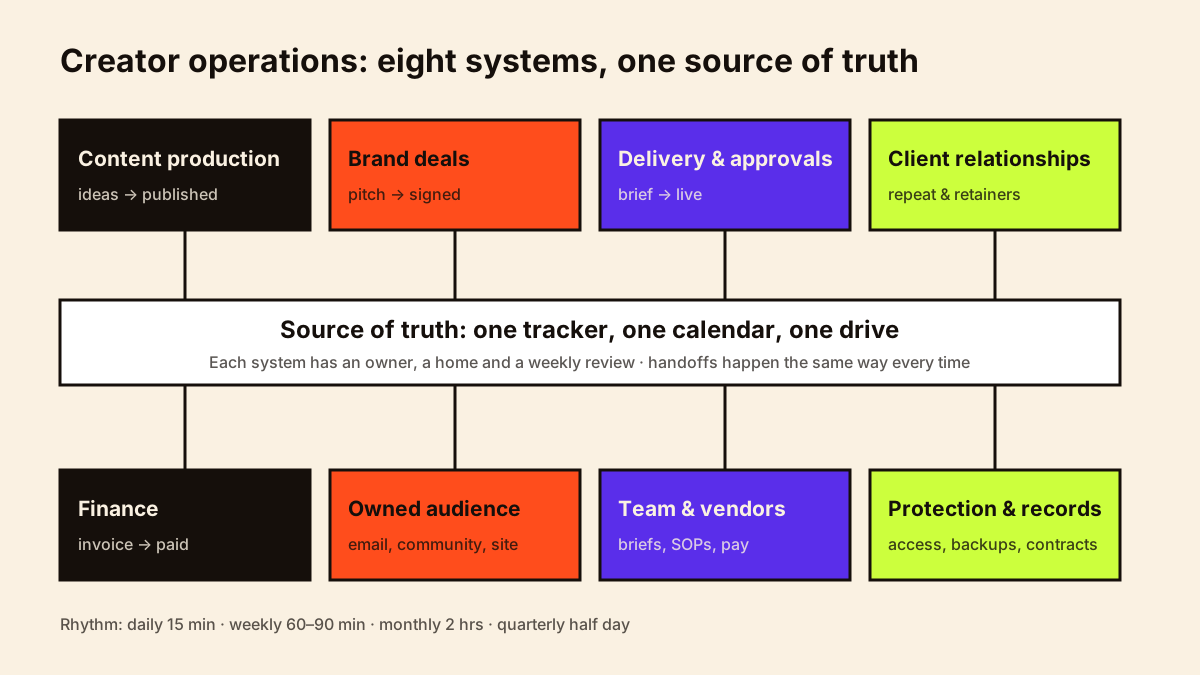
How the systems connect
The systems break at the handoffs. A deal closes in your inbox but never reaches the content calendar. A campaign goes live but the invoice step isn't triggered. A freelancer finishes an edit but nobody knows the brand's approval deadline. Map the handoffs explicitly:
- Signed deal → deliverables and dates added to the calendar and campaign tracker the same day.
- Brand approval received → approval saved with the file, post scheduled.
- Post live → live link and screenshots saved, report date set, invoice sent.
- Invoice sent → payment due date tracked, follow-up reminder set.
- Campaign closed → results added to the case study file and CRM notes updated.
Handoffs that happen the same way every time are the best candidates for automation later. Creator workflow automation covers which ones to automate first.
An operating rhythm
Systems need a heartbeat. Without scheduled reviews, even good tools decay into lists nobody trusts. This rhythm takes roughly two to three hours a week for a solo creator.
| Cadence | Time | What you review |
|---|---|---|
| Daily | 15 minutes | Inbox and DMs for brand enquiries, today's tasks, anything waiting on you |
| Weekly | 60–90 minutes | Content board, campaign deadlines, pipeline follow-ups, unpaid invoices, team questions |
| Monthly | 2 hours | Income vs forecast, expenses, content performance, pipeline health, what broke |
| Quarterly | Half a day | Business plan, rates, tools, which system to improve next |
Operations at each stage
You don't need company-grade operations to post twice a week. Build for the stage you're in and the next one, not three stages ahead.
| Stage | Typical setup | Operations priority |
|---|---|---|
| Solo creator | One person, a spreadsheet, a notes app | One tracker for deals and invoices; a simple content board |
| Solo with freelancers | Editor or designer on a per-piece basis | Briefs, file handoffs, feedback turnaround, freelancer payments |
| Small team | Two to five regular people | SOPs, a shared task tool, clear owners, weekly team check-in |
| Professional creator business | Manager or producer, several revenue lines | Pipeline reporting, finance controls, access management, backups |
| Creator-led company | Multiple channels, products or clients | Department owners, dashboards, documented decisions, continuity plans |
From chaos to systems in five steps
1. Take an inventory
For two weeks, write down every recurring task and where its information lives. Most creators find the same data in four places: the brand's email, a WhatsApp chat, a notes app and memory.
2. Find the most expensive leak
Rank problems by cost: missed income first (unanswered enquiries, unsent invoices, unpaid work), then missed deadlines, then wasted hours. Fix one system at a time.
3. Document the process
Write the steps down in a one-page SOP before choosing software. A clear process in a spreadsheet beats a vague one in an expensive tool. Creator business SOPs has a format and the fifteen processes most worth documenting.
4. Give it one home and one owner
Pick a single source of truth for each system and name who keeps it current, even if that's you. Creator project management and creator task management cover how to organise the work itself.
5. Automate the repeatable parts, then measure
Only automate steps that already work manually. Then track one or two operating metrics per system so you can tell whether it's improving.
Operating metrics worth tracking
| Metric | What it tells you |
|---|---|
| Reply time to brand enquiries | Whether opportunities are dying in your inbox |
| On-time delivery rate | Whether your production capacity matches your commitments |
| Revision rounds per campaign | Whether briefs and approvals are clear upfront |
| Days from posting to payment | Whether invoicing and follow-up are working |
| Hours per finished video or post | Whether production is getting more efficient |
| Share of income from repeat clients | Whether relationships are being looked after |
These sit alongside content and revenue numbers on your creator analytics dashboard.
Worked example
A Pune-based personal finance creator posts three reels and one YouTube video a week and closes two or three brand deals a month. Her problems: two invoices went unpaid for 70 days because she forgot to follow up, and her editor regularly waited for scripts. The inventory showed deal details spread across Gmail, Instagram DMs and WhatsApp. She moved every deal into one tracker with an "invoice sent" and "payment due" column, set a weekly Friday review, and agreed a Monday script deadline with her editor. Nothing about her content changed; her average days to payment and her editor's idle time both dropped within two months.
The example is illustrative, but the pattern is common: the fix was a single source of truth and a rhythm, not new software.
Your business operating system: one central hub
A business operating system is the single place from which the eight systems are run: one hub that links your pipeline, content board, campaign tracker, calendar, finances, SOP library and file structure. It can be a workspace tool or a well-organised set of linked spreadsheets and folders; what matters is that everyone starts there.
| Hub section | Links to |
|---|---|
| Today and this week | Task board, master calendar |
| Brand deals | CRM and pipeline, campaign tracker |
| Content | Idea bank, production board, content calendar |
| Money | Invoice log, income tracker, monthly profit and loss |
| Team | SOP library, access register, contacts |
| Files | Folder structure, brand asset kit, backups status |
The pieces are covered in creator business SOPs, creator file management and creator bookkeeping.
Common mistakes
- Buying tools before defining the process they should support.
- Building company-grade systems for a one-person business.
- Keeping the same information in several places with no single source of truth.
- Setting up a system and never reviewing it.
- Treating operations as admin to squeeze in, rather than work that protects income.
- Automating a process that doesn't yet work manually.
To see where your own gaps are, work through the creator operations checklist; it scores 30 processes across six areas of the business.
Conclusion
Running a content business like a company doesn't mean adding layers. It means knowing your eight systems, giving each one a home and an owner, reviewing them on a steady rhythm and improving the weakest one first. Good operations are mostly invisible: brands get what they signed for, invoices get paid and you get your time back for the work only you can do.