How to Repurpose Social Media Content for Different Platforms Without Repeating the Same Post
How to turn one piece of brand-owned content into posts that suit each platform: a repurposing matrix, one product Reel adapted six ways, a reuse and refresh workflow, what not to repurpose, and what Instagram and Facebook say about originality.
Your team spends two days making a product Reel. It goes up on Instagram, the same file goes to YouTube Shorts and Facebook, the caption gets pasted into LinkedIn, and that's the end of it. On LinkedIn it looks out of place, on YouTube the title is a string of hashtags, and the next month everyone is back to a blank page.
Quick answer
Repurposing means taking the idea, footage and information in one piece of content and rebuilding it for how each platform is used: a carousel for saving, a LinkedIn post for context, a Short with a searchable title, a pin that points to a product page. Change the hook, length, framing and caption, not just the file size. Export clean files without other apps' watermarks, and only reuse creator or customer content within the rights you agreed.
Repurposing is not reposting
Reposting is the same file and caption everywhere. Repurposing starts from the question 'what does someone on this platform want from this?' A person on LinkedIn wants to understand why the product exists or how the business made it. Someone on Pinterest is planning a purchase or a project. Someone on Instagram Stories wants something quick and a reason to tap.
This guide is about your brand's own content: footage you shot, designs you made, articles and product information you own. Creator content follows the rules you agreed with each creator; influencer content repurposing covers that separately.
A content repurposing matrix
Map each type of source asset to what it becomes on each platform. Not every cell needs filling; skip platforms where the idea doesn't fit.
| Source asset | YouTube | |||
|---|---|---|---|---|
| Product Reel (30–60 sec) | Reel, plus Story cut with a poll or link | Short native video with a 'why we made this' post | Short with a literal, searchable title | Video or image pin linking to the product page |
| Long-form video or webinar | Three or four clips as Reels; a quote carousel | Key insight as a text post; one clip | Full video plus chapters; Shorts from highlights | Step-by-step image pins |
| Blog article or guide | Carousel of the main steps | Summary post or document-style carousel | Explainer script for a Short | Infographic pin linking to the article |
| Customer FAQ or comments | Q&A Reel or Story answers | Post on what customers ask most | Shorts answering one question each | FAQ pin for planning-stage buyers |
| Founder or team story | Behind-the-scenes Reel | First-person post from the founder or company page | Longer interview if the story is strong | Usually skip |
| Event or store opening | Reel and Story highlights | Post on what it means for the business | Recap only if it's useful to watch later | Usually skip |
One product Reel, six outputs: a hypothetical example
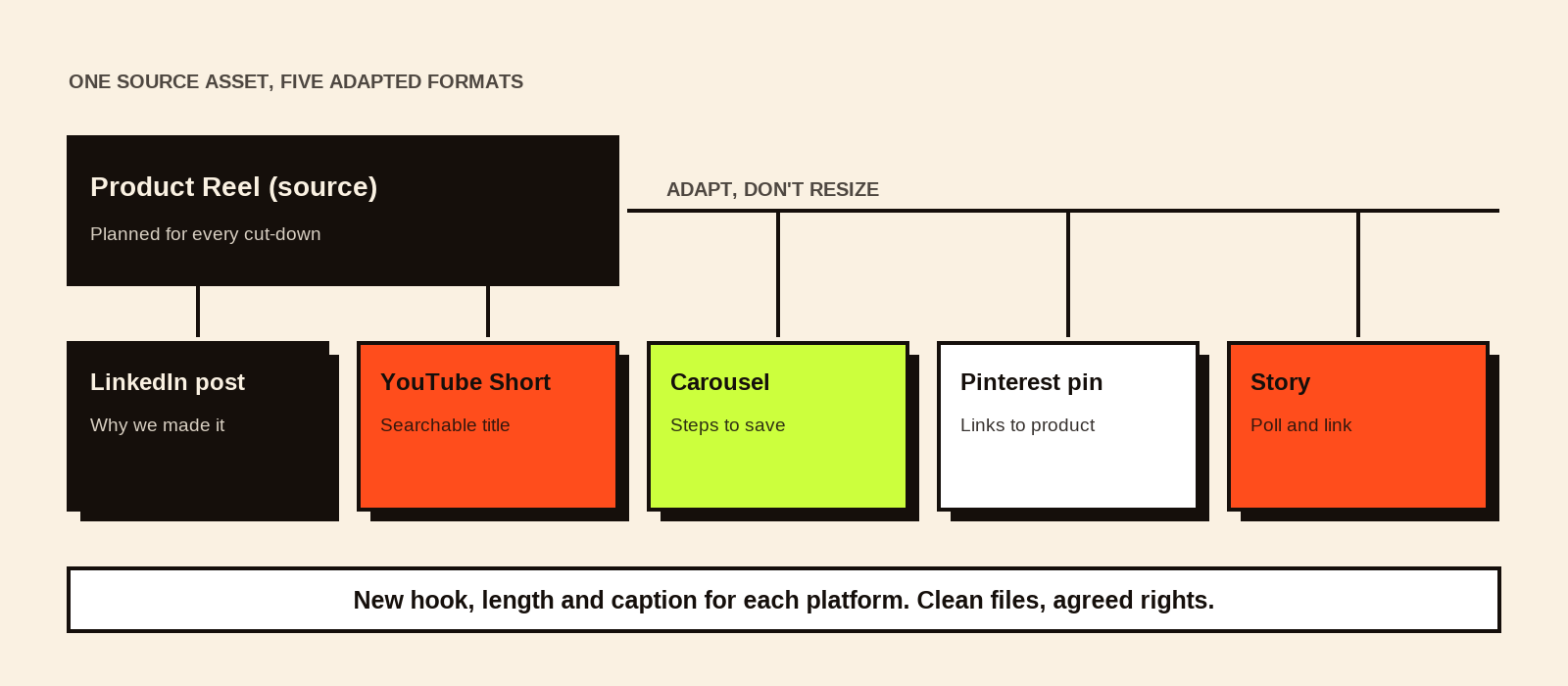
Say a Jaipur home-décor brand, which we'll call Chhapa, shoots a 45-second Reel showing how one block-printed cushion cover is made: carving the block, mixing natural dye, printing, washing and the finished piece on a sofa.
Instagram Reel (the source)
Hook in the first second ('This cushion took nine days'), quick cuts, on-screen text, a caption that tells the story and ends with where to buy.
LinkedIn post
Posted from the company page or the founder's profile, with a shorter cut of the video. The text talks about the artisan partnership, why the brand chose natural dyes and what that means for lead times. No hashtag blocks, no Hinglish, no emoji beyond the voice guide's limit.
YouTube Short
Same footage, re-edited to open on the printing step, which is the most satisfying moment to watch. The title is literal and searchable: 'How hand block printing works (Jaipur cushion cover)'. The description names the technique and links to the product.
Instagram carousel
Six frames pulled from the footage: block, dye, print, wash, dry, finished. One short line per slide. Carousels get saved for reference, so the last slide covers care instructions.
Pinterest pin
A vertical styled image of the finished cushion in a room, with a short text overlay ('Hand block-printed cushion covers') and a link straight to the product page. The description reads like a search phrase, not a caption.
Instagram Story
Three frames: a ten-second clip of the printing, a poll ('Indigo or madder red?'), and a link sticker to the collection. Stories are where you can be quickest and most informal.
One shoot, six pieces of content, none of them a copy. Planning shoots this way is a big part of Reels and short-form video work: scripting with the cut-downs in mind before anyone presses record.
A reuse and refresh workflow
- Plan the cut-downs at the brief stage. Note which platform versions you need before the shoot, so you capture vertical and horizontal angles, close-ups and clean audio.
- Keep a master folder per asset: raw footage, the edited source, project files and clean exports without text or logos baked in.
- Tag every asset in a simple library: product, theme, date, platforms used, performance notes and any rights limits.
- Adapt, don't resize: new hook, new length, new caption and platform-appropriate on-screen text for each version.
- Stagger publishing over days or weeks rather than posting everywhere at once, so each platform version gets your full attention in comments.
- Review after 30 days: which version worked where, and why.
- Refresh evergreen winners every few months with a new hook, updated price or packaging, or a new angle, and retire anything that's out of date.
If you're building the whole production pipeline around this, how to build a repeatable social media content workflow covers ideation, batching and capacity.
What not to repurpose
- Time-bound offers, prices and dates that have passed.
- Product information that has changed: old packaging, discontinued variants, revised ingredients or specs.
- Trend-led content where the trend has moved on; it looks dated on a second platform.
- Replies to a specific customer or complaint, even if they went well.
- Anything with people who only agreed to appear on one platform or for one campaign, including staff who have since left.
- Content that relied on licensed music, fonts or footage you don't have rights to use elsewhere.
Watermarks and cross-posting: what the platforms say
At the time of writing (November 2026), Meta's own guidance is clear on a few points. Instagram's creator FAQ says it encourages original content for the best reach, that it is less likely to recommend reposts of a reel already on Instagram or content with noticeable watermarks, and it advises removing third-party watermarks from Reels.
Facebook's July 2025 post on combating unoriginal content is aimed at accounts that reuse other creators' work. It says you can share the same content across your own Pages or profiles, and that stitching clips together or adding a watermark doesn't count as a meaningful enhancement of someone else's content.
What follows from that is practice, not platform policy: export clean files from your editing software rather than downloading a video from one app to upload to another, avoid posting the identical Reel to the same platform twice, and treat auto-cross-posting tools as a convenience for low-priority posts rather than your main distribution method. Platforms change ranking signals often, so recheck their guidance every few months.
Creator and UGC content: only within agreed rights
If a Reel on your feed was made by a creator or a customer, you can only repurpose it as far as your agreement allows: which platforms, for how long, whether you can edit it, and whether it can run as an ad. A creator who agreed to an Instagram collaboration post hasn't automatically agreed to appear in a YouTube Short or a Pinterest pin.
Check influencer usage rights before you cut creator footage into new formats. When you plan to repurpose from the start, commissioning content through UGC content production with multi-platform rights agreed upfront avoids renegotiating later.
Common mistakes
- Pasting the Instagram caption, with all its hashtags, into LinkedIn and YouTube.
- Uploading a video downloaded from one app, complete with its watermark, to another.
- Using the same hook on every platform when audiences behave differently.
- Repurposing everything instead of the content that actually performed or answers a real question.
- Losing the raw files, so every adaptation has to be made from a compressed export.
- Reusing creator or customer content beyond the platforms and period agreed.
Where to start
Pick your three best-performing posts from the last quarter, map each one through the matrix, and make two adapted versions of each. Set up the asset library as you go, so next month's shoot is planned with the cut-downs in mind.
Planning one shoot for several platforms is part of our social media management scope, from scripting through to platform-specific publishing.