AI Dubbing and Translation for Creators: Reach New Language Audiences Without Losing Your Voice
How YouTube auto dubbing and Meta AI translations for Reels work for Indian creators, which Indian languages they support, when dubbing works and when it doesn't, and a workflow that keeps your voice intact.
You make a video in Hindi, and somewhere a viewer in Chennai or Kolkata would have watched it if they could follow along. AI dubbing now lets YouTube and Instagram turn your video into other languages, often with a few taps. The hard part isn't switching it on. It's making sure the dubbed version still sounds like you, says what you meant, and doesn't create problems with brands.
Quick answer
AI dubbing translates your speech and plays it back as a new audio track in another language. YouTube auto dubbing covers several Indian languages, including English to Hindi, Tamil, Telugu, Bengali, Malayalam and Punjabi, and Meta translates Reels between English and Hindi, Bengali, Tamil, Telugu, Marathi and Kannada. Dub explainers, tutorials and reviews first. Avoid humour-heavy or wordplay content. Review every dub before it goes live, keep a glossary of your catchphrases, get a native speaker to check, and get brand approval before dubbing any sponsored video.
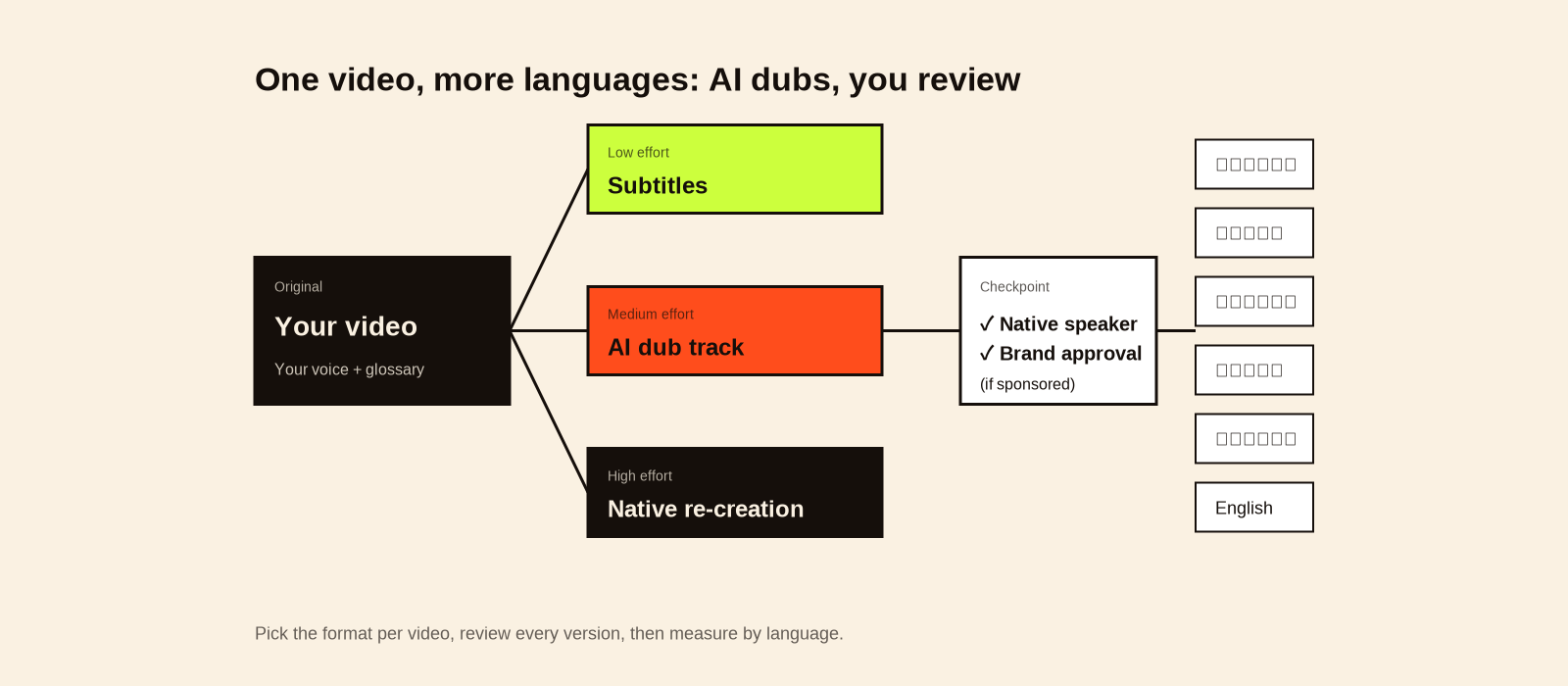
Subtitles, AI dubs, re-recording or native re-creation
There are four ways to reach another language audience, and each one costs a different amount of your time. Pick per video, not per channel.
| Option | What it does | Effort | Best for |
|---|---|---|---|
| Subtitles / captions | Text translation on screen, your original audio stays | Low | Visual content, music-backed Reels, viewers who read comfortably |
| AI dubbing | Machine-translated speech on a new audio track, sometimes in a voice close to yours | Low to medium (you still review) | Explainers, tutorials, reviews with one clear speaker |
| Re-recording yourself | You record a voiceover in the second language over the same visuals | Medium | Languages you speak well, important videos |
| Native re-creation | A new script and shoot made for that audience, often with a local co-creator | High | Comedy, culture-heavy content, launching a new language channel |
Subtitles keep your real voice and tone, but many viewers scroll past text. Dubs remove that barrier but flatten some personality. Native re-creation keeps everything that makes you you, at the cost of a full production. Most creators end up using a mix.
YouTube auto dubbing: what's live as of November 2026
In its February 2026 post on auto dubbing, YouTube said the feature covers 27 languages and "is now available to everyone". The same post said Expressive Speech, which tries to carry your tone and emotion into the dub, is live for all channels in eight languages, including Hindi. Lip sync is still a pilot.
The YouTube Help page on automatic dubbing lists these Indian-language pairs (Expressive Speech marked where supported):
- English to Bengali, Hindi (Expressive Speech), Malayalam, Punjabi, Tamil and Telugu.
- Hindi to Bengali and English (Expressive Speech).
- Bengali, Malayalam, Punjabi, Tamil, Telugu (Expressive Speech) and Urdu to English.
Notice what's missing. There is no Tamil-to-Telugu or Hindi-to-Tamil pair in that list, so a Hindi creator can't directly auto-dub into Tamil on YouTube today. Kannada, Gujarati, Marathi and other languages aren't listed either. Check the Help page before you plan around a language, because the list changes.
Eligibility and controls
- Auto dubbing is on by default for eligible creators.
- A video won't be dubbed if it runs over 120 minutes, has little or no speech, is in an unsupported language, has speech that is too fast, or has copyright claims. Music videos and silent vlogs are skipped.
- You can choose to review dubs before they go live ("Publish manually"), and you can unpublish or delete a dub later. You can't edit a dub directly.
- Lip sync is described as "experimental" and available to select channels. If you have it, it sits under Settings > Channel > Advanced settings.
- Viewers can set preferred audio languages or switch tracks themselves.
YouTube's blog also says auto dubbing has "no negative impact" on your original video's discovery. You can also upload your own dubbed tracks with multi-language audio; ETV Bharat reported in September 2025 that this was expanding to all creators.
Meta AI translations for Reels
Meta's newsroom post on Reels translation gives the timeline. English and Spanish came first in August 2025. Hindi and Portuguese were added on 9 October 2025. On 16 January 2026, rollout began for Bengali, Tamil, Telugu, Marathi and Kannada. Later 2026 updates added more international languages, with Instagram expanding to French, German, Italian, Japanese and Korean on 14 July 2026.
- It's free. On Instagram it's open to all public accounts in countries where Meta AI is available. On Facebook you need 1,000 or more followers.
- You switch on "Translate your voice with Meta AI" before publishing, can add lip sync, and can preview and approve the translation.
- As of the January 2026 update, it works only on single-speaker Reels, with multi-speaker support described as "coming soon".
- Viewers see a "Translated with Meta AI" label and can switch back to your original audio.
The single-speaker limit and the publishing steps come from the Instagram Creators blog, so check it again before planning a collab or podcast clip around translation.
When dubbing works, and when it doesn't
AI translation is good at clear, literal speech. It struggles with anything that depends on how you say something rather than what you say.
| Content type | Dub it? | Why |
|---|---|---|
| Tutorials, how-tos, explainers | Usually yes | Meaning is literal and visuals carry the steps |
| Product reviews (unpaid) | Yes, with review | Check specs, prices and comparisons survive translation |
| Cooking, DIY, fitness | Usually yes | Check measurements, ingredient names and safety cues |
| Comedy, sketches, puns | Rarely | Timing and wordplay rarely survive; consider native re-creation |
| Heavy regional slang or Hinglish code-switching | Test first | Mixed-language lines can come out stiff or wrong |
| Multi-speaker podcasts and collabs | Check support | Meta Reels translation is single-speaker only for now |
| Sponsored content | Only with written brand approval | Claims and disclosures must stay accurate in every language |
Cultural references are the quiet risk. A joke about a Mumbai local train, a cricket nickname or a festival-specific reference may land fine in Hindi and mean nothing to a Malayalam viewer, or translate into something odd. That isn't about one audience being better than another; it's that context doesn't travel automatically. Also watch for anything that sounds like a promise: "guaranteed results" or a health claim can end up stronger or vaguer after translation.
Keep your voice across languages
Your voice is your phrases, your pace and your opinions, not just the sound of your throat. These habits protect it.
1. Build a personal glossary
List the phrases you repeat: your greeting, sign-off, series names, catchphrases and product terms you never want translated. Decide for each one whether it stays in the original language, gets a fixed translation, or gets dropped.
Phrase: [e.g. your opening line]
Meaning / feeling: [what it signals to your audience]
Keep as-is, fixed translation, or drop: [choose one]
Approved Tamil / Telugu / Bengali version: [written by a native speaker]
Notes: [never translate brand names, series names, your handle]
2. Get a native speaker to review
Before you publish a dub, ask someone who speaks the target language natively to watch it. A friend, a creator you collaborate with or a paid reviewer all work. Ask three questions: is anything wrong, does anything sound unnatural, and does it still sound like the same person? Because YouTube dubs can't be edited, the fix for a bad dub is to unpublish it or record your own track.
3. Choose which videos to dub
Start with evergreen videos that already perform well in your main language and have clear, single-speaker audio. Skip time-sensitive posts. Use your creator audience research to see which regions already watch you, since that's a stronger signal than guessing.
4. Localise titles, descriptions and thumbnails
A Tamil audio track behind an English-only title and thumbnail text is easy to miss. Where your platform lets you add translated titles and descriptions, write them properly rather than machine-pasting them, and keep thumbnail text short or language-neutral. The principles in creator title strategy apply in every language.
5. Read comments by language
Comments in a new language are your most honest quality check. Look for confusion ("what did he mean?"), corrections, or people asking for the original. Reply where you can, even briefly, and note repeated complaints in your glossary.
How to tell if it's working
Don't judge on one video. Pick five to ten dubbed videos, wait a few weeks, then compare. Check what YouTube Analytics shows for your dubbed videos; the reporting options change, so look for audio-track, language or geography breakdowns in your own Studio rather than assuming one exists. On Instagram, compare reach and audience location in Insights for translated vs untranslated Reels. Our guide to YouTube analytics for creators explains the core metrics.
- Is watch time or reach from new regions rising on dubbed videos compared with similar undubbed ones?
- Are comments in the new language positive, confused or asking for the original?
- Are new subscribers or followers coming from those regions?
- Are any dubbed videos getting noticeably worse retention than the original? That can point to a translation problem.
Illustrative example: a Hindi personal-finance creator turns on English dubbing for 10 explainers and keeps 10 similar videos undubbed for comparison. After six weeks they check whether watch time from outside their usual regions grew more on the dubbed set. If it did, they add Bengali; if not, they look at comments before deciding.
Sponsored content: brand approval comes first
A brand approved your Hindi script, not a Tamil one it has never heard. Treat a dub of paid content as a new deliverable.
- Check your contract. If it doesn't mention dubbing or translated versions, ask the brand in writing before turning it on. Usage rights may cover only certain languages or platforms.
- Send the brand the translated audio or script for approval, the same way you would any revision.
- Check product claims, prices, offer terms and discount codes line by line. A changed number is a misleading claim.
- Keep the ad disclosure in every language version, both on screen and, if you say it out loud in the original, in the dubbed audio.
- If you can't get approval, turn off auto dubbing for that video or delete the dub.
On language, ASCI's influencer guidelines say the disclosure label must be in English or the language of the ad, and for videos it should be superimposed on screen rather than only in the caption.
Our guide to brand content approval and revisions covers how to ask without sounding difficult, and the creator disclosure guide covers labels in detail.
Do you need an AI label for dubs?
Platform features label their own output: Meta shows "Translated with Meta AI". YouTube's altered-content rules say cloning your own voice for voiceovers doesn't need the "AI use" disclosure on its own, while realistic content that makes a real person appear to say something they didn't does. If you use a third-party tool to clone your voice into another language, Meta says it may require an AI label for realistic-sounding audio. ASCI's new AI labelling guidelines, published in September 2026 and not yet in force, treat translations as an accessibility use that doesn't need a label. When in doubt, a short line such as "Dubbed with AI from my original Hindi video" costs you nothing. The full rules are in our guide to AI disclosure for creators.
Should you dub this video? A decision table
| Question | If yes | If no |
|---|---|---|
| Is it one clear speaker with little background music? | Go to next question | Use subtitles or re-record |
| Is the meaning mostly literal (steps, facts, opinions)? | Go to next question | Consider native re-creation |
| Is the language pair supported on this platform? | Go to next question | Use subtitles or your own dubbed track |
| Is it sponsored? | Get written brand approval first | Go to next question |
| Can a native speaker review it before or soon after publishing? | Dub it | Hold the dub until someone can |
Step-by-step workflow
- Pick one target language based on where your audience already comes from.
- Choose 5 to 10 evergreen, single-speaker videos.
- Update your glossary of phrases, names and terms.
- In YouTube Studio, set dubs to publish manually so you can review first. On Reels, preview the translation before posting.
- Have a native speaker check each dub; unpublish anything with errors.
- Add translated titles and descriptions where supported, and check thumbnail text.
- For sponsored videos, get written brand approval and confirm the disclosure appears in the dubbed version.
- Publish, then read comments by language for two weeks.
- Compare against similar undubbed videos after four to six weeks, and decide whether to expand, adjust or stop.
If you're building AI into your whole process, our AI content workflow for creators shows where human checkpoints go, and AI tools for creators covers which tasks AI handles well.
The regional angle: Hindi, Tamil, Telugu, Bengali, Malayalam and Punjabi
For Indian creators, dubbing works in both directions. A Telugu or Tamil tech reviewer can reach English-speaking viewers through the to-English pairs, and an English creator can reach Hindi, Tamil, Telugu, Bengali, Malayalam and Punjabi viewers on YouTube. On Reels, a Hindi creator can translate into Bengali, Tamil, Telugu, Marathi or Kannada from the January 2026 rollout, subject to Meta's eligibility rules.
Each audience has its own creators, references and expectations, so don't assume a video that worked in one language will work the same way in another. Some topics, like phone reviews or exam tips, travel well. Others, like local food or regional humour, may be better made fresh, possibly with a creator from that language. Our guide to regional creator growth in India covers building a regional audience, and a YouTube content strategy helps you decide whether a new language belongs on your main channel. Dubbed or not, every version should carry accurate captions; see our guide to captions, subtitles and accessibility.
Conclusion
AI dubbing gives you a low-cost way to test new language audiences, but the tool only translates words. Your job is to choose the right videos, protect your phrases with a glossary, get a native speaker to check, localise the packaging, and treat sponsored dubs as a new deliverable that needs brand approval. Start small, measure against undubbed videos, and expand only into languages where viewers clearly respond.