Restaurant Menu Photography and Short-Form Video: A Content Brief for Social Media Teams
A production brief for restaurant social media teams: what to agree before a menu shoot, a copy-ready shoot brief template, a shot list for stills and Reels, and the accuracy and consent checks that keep content honest.
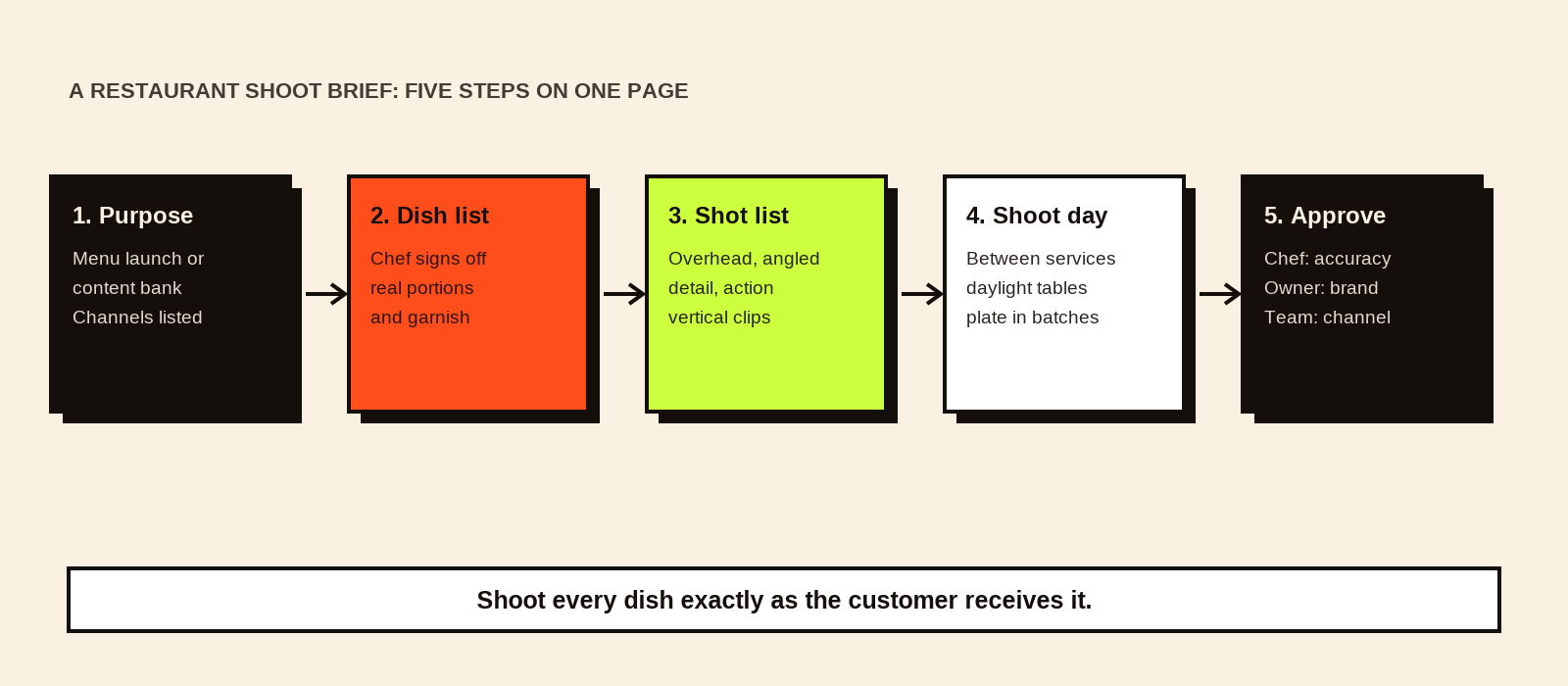
The photographer arrives at 12:30, just as the lunch rush starts. The chef has plated six dishes, two of which are not on the new menu yet, nobody has decided whether the shoot is for the menu card, Instagram or the delivery app, and the Reels editor later finds that every clip was filmed horizontally. A half-day shoot produces a folder of beautiful files that the social media team can barely use.
Quick answer
Social media content for restaurants is easier to produce when every shoot starts from a one-page brief. The brief names the purpose and channels, the exact dishes and their real portions, a shot list that covers stills and vertical video, the shoot window around service, who is in frame and has consented, and how files are named, edited and approved. Shoot each dish as customers receive it, and plan the edit before anyone picks up a camera.
Who the brief is for, and why it saves the shoot
A restaurant shoot involves more people than most product shoots: the owner who pays for it, the chef who plates, the floor manager who has to keep service running, the photographer or videographer, and the person who will edit and post. Each one assumes the others know the plan. The brief is the single page they all read the day before.
It also stops scope drift: 'while you're here, can you get the bar and the team too' belongs in the shot list with time set aside, not squeezed in when the light has gone. If your restaurant hasn't settled what it posts and why, start with the strategy in our guide to social media marketing for restaurants and cafés, then come back to production.
The seven parts of a restaurant shoot brief
1. Purpose and channels
Say what the content is for: a new menu launch, a monthly content bank, a festive campaign, or refreshing menu photos for Google and delivery listings. Then list the channels. Instagram feed, Reels, Stories, Google Business Profile and delivery apps each need different crops, so the shooter must know before framing.
2. The dish list, with real portions
List every dish by its menu name, with the plate or bowl it is served in, the garnish and the portion customers get. The chef signs this list off. It is the reference that keeps photos honest, and it tells the kitchen how many plates to prepare (usually a hero plate plus a backup for melting or wilting items).
3. Shot list
Break each dish into specific shots: overhead still, 45-degree still, a detail, and one or two short vertical clips such as the pour, the tadka or the first cut. The shot list below is a starting point you can copy.
4. Location, light and timing
Pick the tables with the best daylight and agree the shoot window around service, usually the quiet hours between lunch and dinner. Note which areas can be closed off and when the kitchen can plate for the camera without delaying real orders.
5. People and consent
Name the staff who will appear and confirm they are comfortable being filmed. If diners might be in frame, decide in advance: shoot when the room is empty, keep guests out of focus, or ask identifiable guests for permission and record it. Never post a recognisable customer without their agreement.
6. Style references and brand rules
Attach three to five references from your own feed or mood board, plus the props, surfaces and colours that match the restaurant. Note what to avoid, such as props from a different cuisine or garnishes the kitchen never uses.
7. Delivery, editing and approval
State the file formats, naming convention, deadline for selects and who approves the final edits. The approval step is short for food: the chef checks accuracy, the owner checks brand fit, and the social team checks that each asset suits its channel.
Copy-ready shoot brief template
RESTAURANT SHOOT BRIEF

Restaurant / outlet: ____________________
Shoot date and window: ____ (e.g. 3:00 pm to 6:00 pm, between services)
Brief owner: ____ | Chef sign-off: ____ | Final approver: ____

1. PURPOSE
What this shoot is for: [new menu / monthly content bank / festive campaign / listing refresh]
Where it will be used: [Instagram feed | Reels | Stories | Google Business Profile | delivery apps | menu card]

2. DISH LIST (chef to confirm)
Dish name | Plate or bowl | Portion as served | Garnish | Plates needed | Notes (melts, wilts, steam)
____ | ____ | ____ | ____ | ____ | ____

3. SHOT LIST
See attached shot list. Priority shots marked *.

4. LOCATION AND LIGHT
Tables / areas: ____ | Light: daylight from ____ | Areas closed during shoot: ____
Kitchen plating slots: ____ (must not delay live orders)

5. PEOPLE AND CONSENT
Staff appearing: ____ (each has agreed: yes / no)
Guests: [room empty | guests out of focus | written permission for anyone identifiable]

6. STYLE
References attached: ____ | Props and surfaces: ____ | Avoid: ____
Accuracy rule: shoot every dish as a customer receives it. No extra toppings, no substitute ingredients, no portions bigger than served.

7. DELIVERY
Stills: ____ (format, crops 4:5 and 1:1) | Video: vertical 9:16 clips, plus horizontal only if requested
File names: date_dish_shot-type_number (e.g. 2026-11-20_paneer-tikka_overhead_01)
Selects due: ____ | Edits due: ____ | Approval: chef (accuracy), owner (brand), social team (channel fit)
Shot list: menu stills and short-form clips
Most dishes need four to six assets. The table is a copyable list; trim it for simple items like a cold coffee and expand it for signature dishes.
| Shot | Format | What it shows | Production note |
|---|---|---|---|
| Overhead hero | Still, 4:5 and 1:1 | The full dish and its sides | Even daylight, plate rim wiped, real cutlery |
| 45-degree hero | Still, 4:5 | Height and layers (burgers, cakes, biryani) | Shoot at table height, as a diner sees it |
| Texture detail | Still, close-up | Crumb, char, glaze, garnish | Fresh plate if the hero has been sitting |
| Action clip | Vertical video, 3 to 8 seconds | Pour, tadka, cheese pull, slice, steam | Several takes; keep the camera still |
| Making-of clip | Vertical video, 10 to 20 seconds | Two or three prep steps by the chef | Film in the real kitchen during prep, with permission |
| Serve clip | Vertical video, 3 to 6 seconds | Plate set down at a table | Use staff, not paid extras posing as diners |
| Context still | Still, 4:5 | The dish in the room, with drinks and table setting | Keep any guests out of focus or ask first |
| Menu card or listing | Still, plain background | A clear, accurate view for menus and apps | Match the delivery portion and packaging if used there |
At the time of writing (November 2026), Instagram's Help Centre says Reels can use an aspect ratio between 1.91:1 and 9:16, and that photos are shared at a width of up to 1080 pixels. Shooting video vertically from the start avoids cropping out the action later. Instagram's help pages also list watermarked, bordered and blurry Reels among those it may show less often, so export clean files without another app's watermark.
Running the shoot day around service
- Day before: chef confirms the dish list and prep; floor manager blocks the tables; brief goes to everyone.
- Arrival (30 minutes before the window): set up near the window, test light, clean surfaces and glassware.
- Plate in batches of two or three dishes so food is photographed within minutes of plating.
- Shoot stills first while the dish is at its best, then the action clips, then the detail shots.
- Film the making-of clips during real prep rather than staging a fake rush.
- Back up the cards before leaving, and note the best takes against the shot list.
Most restaurants also need a lighter, ongoing version: ten minutes of phone capture during each prep shift, guided by a short weekly shot list from the social team. That steady stream is what fills Stories and keeps the Reels calendar going between planned shoots. Our Reels planning guide shows how to turn that footage into a month of ideas without repeating yourself.
Accuracy, claims and consent checks
Food content is advertising for the restaurant, so the usual claim rules apply to what you show and write. India's Food Safety and Standards (Advertising and Claims) Regulations, 2018 say claims must be truthful, unambiguous, meaningful and not misleading (Regulation 4), and they put conditions on words such as natural, fresh, pure, original, traditional and authentic (Regulation 9, read with Schedule V, in FSSAI's compendium version dated 16 November 2021). The ASCI Code also expects factual claims to be capable of substantiation. Check current obligations with your legal adviser if you plan any health, nutrition or sourcing claims.
- The dish in the photo matches the menu description, portion and garnish.
- No ingredient is swapped for the camera (for example, a different cheese because it melts better).
- Captions make no 'fresh', 'healthy', 'organic' or 'homemade' claim the kitchen can't back up.
- Spice level, veg or non-veg status and key allergens in the caption match the menu.
- Every identifiable staff member and guest has agreed to appear.
- Music is from the platform's licensed library or otherwise properly licensed.
On music, Instagram's Help Centre says licensed audio must credit the artist and track, and that licensed audio can be muted if agreements with rights holders change. Keep the original, unmixed clips so a Reel can be re-edited if that happens.
After the shoot: from files to a content bank
Selects should come back within a few days while the menu is still fresh in everyone's mind. Tag every file with the dish name, shot type and channel, then slot the assets into the calendar: hero stills for the launch post, action clips for Reels, details for carousels and Stories, plain shots for Google and delivery listings. A shared folder with that structure means anyone on the team can find the right file in seconds. Our content workflow guide covers the wider pipeline from brief to publishing.
Note what was missed or didn't work, such as dishes that lost their shape, and fold it into the next brief.
Common mistakes
- Booking a shoot during service, so food waits and real customers wait too.
- No chef sign-off on the dish list, leading to dishes that look different from what is served.
- Shooting only horizontal video and losing the action when it is cropped for Reels.
- Over-editing colour so the food looks unlike the plate on the table.
- Posting diners or staff who didn't agree to appear.
- Treating the shoot as the whole plan, with no weekly phone capture to fill the gaps.
Where to start
Copy the template, fill in the dish list with your chef, and run your next shoot in the quiet hours between services. Even a phone shoot improves when everyone has read the same page the day before.
If you work with an agency, be clear about who does what: in our social media management scope, Reels are edited from footage the restaurant or creators supply, and photo or video shoots are scoped separately through content creation services.