How Beauty Salons Can Plan a Monthly Social Media Calendar Around Repeat Bookings
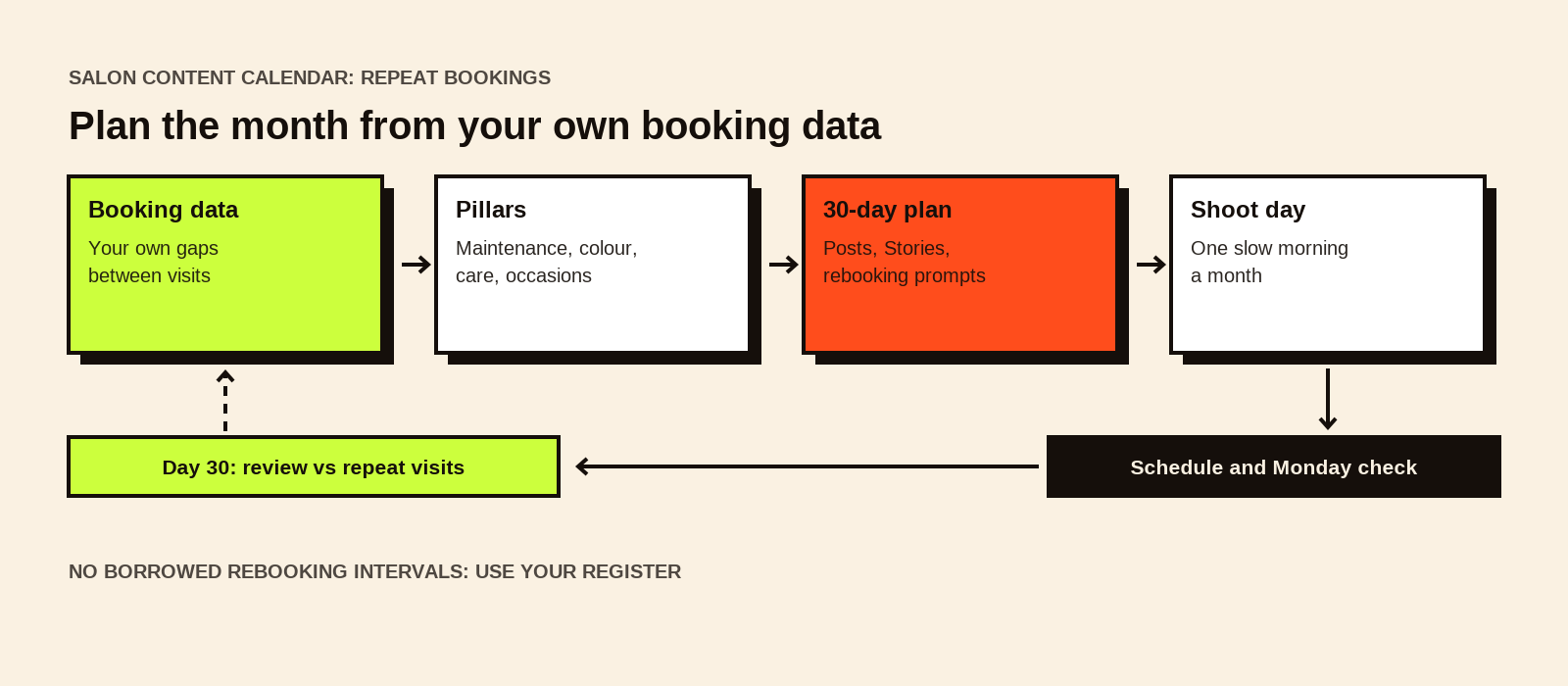
An operating calendar for salons: build pillars from your service cycles, find your own rebooking rhythm from booking data, then run a ready-to-adapt 30-day calendar with one shoot day a month.
It's the first of the month and the salon's Instagram has nothing planned. The owner posts a festive greeting, a stylist uploads a Reel on Thursday, and by the third week the account goes quiet because the chairs are full. Meanwhile the booking register shows clients who came in for colour weeks ago and haven't been back. The calendar and the register never meet.
Quick answer
A salon social media content calendar should follow your service cycles and your own booking data. Build pillars around what clients come back for, check your records for when they typically return, and place rebooking prompts around those gaps. Shoot a month's material on one batch day, schedule posts in advance, and review the month against repeat visits rather than likes.
Start with your booking data, not a template
Rebooking content only works if it matches when your clients actually return. That gap differs by salon, service, hair type and client, so don't borrow a number from someone else's blog. Pull it from your own records.
SERVICE GROUP        | TOP 3 SERVICES | TYPICAL GAP BETWEEN VISITS (your median, in weeks) | SHARE OF CLIENTS WHO RETURNED | SLOW DAYS AND HOURS
Cuts                 |                |                                                    |                               |
Colour               |                |                                                    |                               |
Hair and skin care   |                |                                                    |                               |
Nails                |                |                                                    |                               |
Occasions and bridal |                |                                                    |                               |

HOW TO FIND THE TYPICAL GAP
1. List clients who visited more than once for that service.
2. Note the number of days between their visits.
3. Sort the list and take the middle value (the median).
4. If only a handful of clients repeated, treat the figure as a rough guide and recheck next quarter.
Most salon booking software can export visit history. With a paper register, a sample of recent clients is enough to start. Keep names out of the calendar itself: it needs patterns, not personal data.
Service-cycle pillars
Pillars are the recurring themes the month rotates through. For a salon, the most useful pillars follow the services clients return for, plus one for the salon itself.
| Pillar | What it covers | Typical posts | Rebooking angle |
|---|---|---|---|
| Maintenance | Cuts, root touch-ups, nail refills | Fresh-cut Reels, styling in between visits, what grows out first | Prompt in the week your worksheet says most clients return |
| Colour journeys | Colour, highlights, corrections | Consultation clips, aftercare, how colour looks at home over time | Toner or gloss refresh only if your stylists offer and recommend it |
| Care and treatments | Hair spas, scalp care, facials you offer | What happens, how long it takes, aftercare | Seasonal care slots |
| Occasions | Weddings, festivals, parties | Trial process, lead times, group bookings | Book-ahead reminders before your busy dates |
| The salon | Team, space, cleaning routine, training | Meet the stylist, behind the scenes | A named stylist to rebook with |
For individual post ideas and how enquiries reach you, see our guide to social media marketing for salons. This article is about the operating rhythm that keeps those posts going every month.
Rebooking prompts that respect clients
A calendar can prompt rebooking in public, through posts and Stories, and in private, through messages to clients who agreed to hear from you. Keep the two separate.
- Public prompts: 'Booked your next trim?' Stories in the week your data shows most returns, open-slot Stories on slow days, and book-ahead posts before festive or wedding peaks.
- At checkout: ask whether the client wants to book the next visit now. It needs no content and leaves the decision with her.
- Private reminders: message only clients who opted in, and stop when they ask. WhatsApp's Business Messaging Policy (last updated September 2026) says businesses may contact people only if they shared their number and gave opt-in permission, and must respect requests to opt out.
- No guilt or false scarcity, such as 'your colour is fading, only two slots left', and never comment on a client's appearance.
- Don't name or show clients in rebooking posts without their written consent.
Read WhatsApp's Business Messaging Policy if you plan any reminder messages, and keep a simple opt-in record next to each number.
The ready-to-adapt 30-day calendar
This calendar assumes about four feed posts a week and Stories most days, for a salon offering hair, care and nail services. Move the rebooking days to match your worksheet and delete pillars you don't offer. Days are numbered, so you can start on any date.
| Day | Pillar | Feed post | Stories or rebooking prompt |
|---|---|---|---|
| 1 | The salon | Carousel: this month's stylist rota and working days | Reminder of your booking route |
| 2 | Maintenance | Reel: one cut styled two ways | Poll: when was your last trim? |
| 3 | Colour journeys | None | Behind the chair: colour mixing (no client face without consent) |
| 4 | Colour journeys | Carousel: what happens in a colour consultation | Questions sticker: ask our colourist |
| 5 | The salon | None | Real open slots for the weekend |
| 6 | Care and treatments | Reel: your hair spa from start to finish | Reshare a tagged client Story (with permission) |
| 7 | Rest | None | None; inbox only |
| 8 | Maintenance | Carousel: what grows out first and how to style in between | Rebooking prompt timed to your worksheet gap |
| 9 | Occasions | None | Poll: any events coming up? |
| 10 | Nails | Reel: refill vs new set, explained | Slow-day nail slots |
| 11 | The salon | Carousel: meet a stylist (speciality, days, most-asked question) | Questions sticker: ask [stylist] |
| 12 | Colour journeys | None | Answers to the colourist questions |
| 13 | Care and treatments | Carousel: care between visits, from your stylists | Product shelf (no claims beyond the label) |
| 14 | Rest | None | None; inbox only |
| 15 | Occasions | Carousel: how your bridal or party trials work and the lead times you set | Book-ahead reminder before your peak dates |
| 16 | Maintenance | Reel: a quick blow-dry tip from a stylist | Rebooking prompt (new visual) |
| 17 | The salon | None | Your real cleaning routine between clients |
| 18 | Colour journeys | Reel: a colour appointment in 30 seconds (with consent) | Poll: warm or cool tones? |
| 19 | Nails | None | Real open slots for the weekend |
| 20 | Care and treatments | Carousel: which care service is which, using your menu names | Questions sticker |
| 21 | Rest | None | None; inbox only |
| 22 | The salon | Reel: a day at the salon in 30 seconds | Training day or team moment (with consent) |
| 23 | Maintenance | Carousel: answers to this month's top three DM questions | Rebooking prompt for clients due this week |
| 24 | Occasions | None | Festive or wedding-season slot planner (real availability only) |
| 25 | Colour journeys | Carousel: colour aftercare your stylists recommend | Reshare tagged clients (with permission) |
| 26 | Nails | Reel: one nail design in three colourways | Slow-day slots |
| 27 | Care and treatments | None | 'This or that' poll for next month's content |
| 28 | Rest | None | None; inbox only |
| 29 | The salon | Carousel: month in review (work you're proud of, with consent) | Next month's rota preview |
| 30 | Planning | None | Review day: compare the month with your booking data |
One shoot day a month
Salons are busiest exactly when content is needed. Batch the filming instead: block a slow morning from your worksheet once a month, ideally the week before the new month starts, and shoot everything on the calendar in one go.
DATE: ________  TIME: ________ (a slow slot from your worksheet)  LEAD: ________

BEFORE
[ ] Shot list made from next month's calendar, Reels first
[ ] Models booked: staff or clients who have signed consent for social use
[ ] Consent forms ready; no identifiable minors without a parent's or guardian's written consent
[ ] Stations, tools and products cleaned and arranged
[ ] Phone charged, storage cleared, lens wiped, a light source set up

SHOT LIST
[ ] Reels: [list from the calendar]
[ ] Carousel photo sets: [list]
[ ] Short clips for Stories: hands at work, mixing, tools, reception, street view
[ ] One meet-the-stylist set

AFTER
[ ] Files named by date and pillar, saved in a shared folder
[ ] Consent forms filed with the file names they cover
[ ] Edits limited to light and colour correction; no filters that change the result
One shoot can feed many Reels if you plan angles and cut-downs in advance. Our guide to planning a month of Instagram Reels shows how to vary them without repeating the same idea.
Scheduling and the weekly check
Schedule the month's feed posts in advance so a busy Saturday doesn't mean silence. At the time of writing (November 2026), Meta Business Suite lets businesses create and schedule posts and Stories for Facebook and Instagram from one place; check Meta's help pages for current options. Then spend 15 minutes every Monday on this check.
- Are this week's open-slot Stories still true?
- Has anything changed: a stylist on leave, a holiday closure, a new service?
- Do any scheduled posts mention prices or offers that have since changed?
- Did last week's rebooking prompt bring messages? Note how many.
- Who is covering the inbox this week, and at what times?
Keep approvals light: one person, usually the owner or manager, signs off the whole month in one sitting, and only urgent changes come back during the month. Our general guide to a monthly social media content calendar covers calendar fields and the planning meeting for larger teams.
Reviewing the month
On day 30, compare the calendar with the register, not only with Instagram insights.
| Question | Where to look | What to change |
|---|---|---|
| Did clients due for maintenance come back? | Booking records against your worksheet gap | Move or reword the rebooking prompts |
| Which posts led to messages? | DMs and WhatsApp chats noted by post | Repeat those formats next month |
| Which slow slots filled? | Booking register | Keep or drop open-slot Stories on those days |
| Did the shoot day cover the month? | Unused or missing assets | Adjust the next shot list |
| Did anything go out wrong? | Price, rota or offer errors | Add a line to the Monday check |
Calendar mistakes salons make
- Copying someone else's rebooking interval instead of using your own data.
- Planning 30 feed posts and abandoning the plan by week two.
- Sending reminder messages to clients who never opted in.
- Festive slot posts that claim scarcity that isn't real.
- Filming on the busiest day, when nobody has a spare minute.
Set it up this week
Fill in the worksheet from your records, choose the pillars that match your menu, adapt the 30 days, and book next month's shoot morning. After the first month, the review table will tell you which prompts to keep.
If you'd prefer someone to turn the worksheet into a scheduled month, content planning is part of our social media management scope; on-site shoots are quoted separately.