Social Media Marketing for Home Service Businesses: How to Generate Local Enquiries Through Content
A practical guide for plumbing, electrical, cleaning, pest control, AC servicing and repair businesses: service-area content, safe demo videos, technician introductions, WhatsApp enquiry handling and a weekly plan.
An AC servicing business with four technicians gets most of its work from the same three housing societies. In summer the phone doesn't stop; in the cooler months the team waits. The Instagram account has a logo, a phone number and twenty posts saying 'Best AC service in town'. People in the next neighbourhood don't know the business exists, and anyone who finds the page can't tell which areas it covers, who will turn up or what a visit involves.
Quick answer
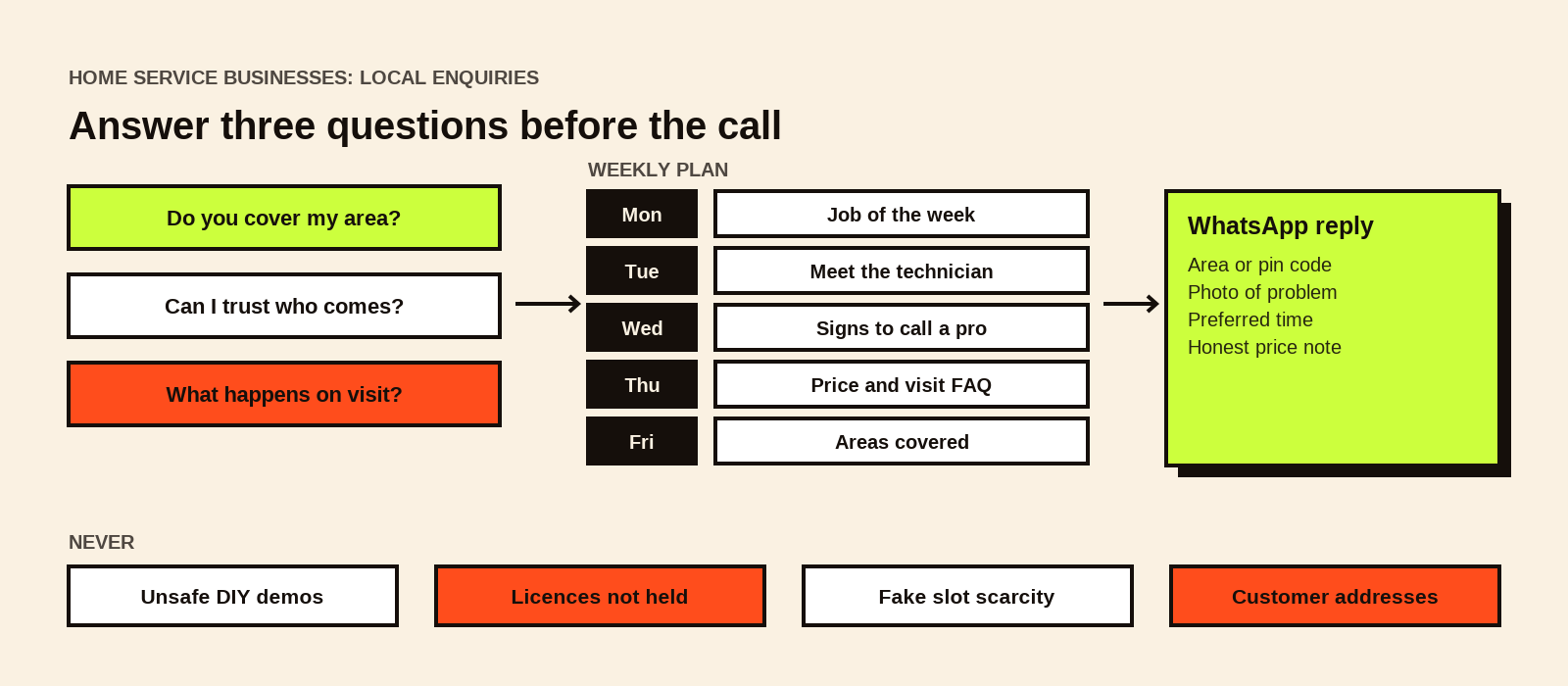
Social media marketing for home service businesses works when content answers what a homeowner needs to know before letting someone in: do you cover my area, can I trust the person who comes, and what will happen on the visit. Show real jobs with permission, introduce your technicians, state service areas and timings clearly and reply quickly on WhatsApp. Never post DIY demos for electrical, gas or chemical work, and claim only licences, warranties and safety features you actually have.
Where home-service enquiries come from
Most home-service work starts with a problem, not a scroll: a leaking tap, a tripping switch, cockroaches in the kitchen, an AC blowing warm air. The homeowner asks neighbours, searches nearby or checks a society WhatsApp group, then looks you up before calling. Your content's job is to pass that quick check.
| Moment | What they check | Content that helps |
|---|---|---|
| Something breaks | Do you cover my area? Can you come today or tomorrow? | Service-area posts, timings, how to book |
| A neighbour recommends you | Is this a real, active business? | Recent jobs, consistent name and number, replies to comments |
| Before letting someone in | Who will come? Will they be careful in my home? | Technician introductions, uniforms and ID if you use them, shoe covers and clean-up routine |
| Comparing two options | What will it cost? What's included? | What affects the price, visit charge policy, what a service covers |
| Seasonal or planned work | Should I book before the rush? | Honest seasonal reminders, real slot availability |
Make your service area and timings unmissable
- List the localities, pin codes or landmarks you cover in your bio, a pinned post and a Highlight. 'All of Bengaluru' is rarely true.
- Say how far you'll travel for which jobs, if it differs (for example, emergency repairs only nearby).
- State working hours and whether you take emergency calls, and keep them identical on Instagram, Facebook, WhatsApp and Google.
- Show the same business name and phone number everywhere, matching your vehicle or uniform branding if you have it.
- Mention the languages your team speaks; it reassures many households.
- Update holiday and festival timings before the day, not after.
Google Business Profile matters as much as Instagram for nearby searches. Our guide to social media marketing for local retail stores explains how to keep it accurate alongside Instagram and WhatsApp, and the same approach works for service businesses.
Show the work, not a DIY tutorial
How-to videos get views, but a homeowner copying your technician on a live circuit or a gas line can get badly hurt. Your content should show competence and explain when to call a professional, not teach people to do risky work themselves.
| Trade | Safe to show | Don't show |
|---|---|---|
| Electrical | Finished work, tidy wiring, warning signs such as a burning smell or a hot switch, with 'stop using it and call a qualified electrician' | Step-by-step repairs on wiring, boards or appliances |
| Gas and appliances | Your technician arriving and explaining what they check | Any gas fitting, leak testing or appliance opening; tell viewers to follow their gas supplier's safety instructions |
| Plumbing | Before-and-after of a fix, how to describe a problem when booking | Work that needs tools or access most homeowners shouldn't attempt |
| AC servicing | What a service visit covers; owner care only as the manufacturer's manual allows, with a pointer to it | Opening units, refrigerant work, electrical parts |
| Pest control | The preparation checklist you give customers, what to expect on the day | Mixing or applying chemicals, dosage, product handling |
| Cleaning | Results, the equipment your team brings, how long a job takes | Mixing cleaning chemicals |
Technicians, credentials and claims
People are letting a stranger into their home. Introducing the technician by first name, with their trade and years of experience, does more than any slogan. Ask each technician for consent before featuring them, let them see the post first, and remove it if they leave and ask you to.
Be strict about what you claim. Show a licence, registration, certification or trade qualification only if the business or the technician in the post actually holds it, it's current and you can show the document. We haven't listed licensing rules for each trade because they vary by trade and by state; check with the relevant authority or your trade association rather than relying on social media posts. Say 'background-verified' only if you ran a real check and can describe it.
Section 2(28) of the Consumer Protection Act, 2019 counts an ad that gives a false guarantee or deliberately conceals important information as misleading, and the ASCI Code requires factual claims to be capable of substantiation. In practice that means 'guaranteed pest-free', 'lifetime warranty', 'odourless', 'herbal' or 'safe for children and pets' appear only if they're true, documented and match the terms you'd give in writing.
A weekly content plan
This plan suits a small team posting four or five times a week from phone footage the technicians capture on jobs. Adjust it to your trade and season, and keep one person responsible for checking consent and claims before anything goes out.
| Day | Content | Format | Job it does |
|---|---|---|---|
| Monday | Job of the week: before and after, with the customer's permission and no address visible | Reel or carousel | Proof of real work |
| Tuesday | Meet the technician: name, trade, years of experience, one tip about booking | Reel | Trust before the visit |
| Wednesday | Signs you need a service, ending with when to call a professional | Carousel | Problem recognition, safely |
| Thursday | FAQ: what affects the price, how long a visit takes, what to keep ready | Reel or Stories | Removes doubts before the call |
| Friday | Areas we covered this week, with landmarks, not house numbers | Single image or Stories | Service-area recall |
| Saturday | A review shared with permission, or a reply to a common comment | Stories | Social proof |
| Daily | Stories: real slot availability, team on the move, seasonal reminders | Stories | Shows the business is active |
WEEK OF: ________   SEASON NOTE: ____________

Jobs filmed this week (customer consent recorded?):
1) ________ [ ] yes   2) ________ [ ] yes   3) ________ [ ] yes
Technician to feature (consent recorded?): ________ [ ] yes
Question customers asked most: ________
Areas covered: ________

CLAIMS CHECK before posting
[ ] No address, house number, society gate or family photos in frame
[ ] No DIY steps for electrical, gas or chemical work
[ ] Warranties and licences shown are real and current
[ ] Prices or visit charges match what we actually charge
[ ] Slot availability is true today
What to stop posting
- 'Best in the city' and '100% satisfaction' slogans you can't prove.
- Stock photos of technicians who don't work for you.
- Prices that are out of date the week after you post them.
- Fake 'only 2 slots left today' Stories. The CCPA's 2023 dark patterns guidelines name false urgency.
- Videos where a customer's home, family or valuables are clearly visible.
Read the CCPA's dark patterns guidelines before you write offer posts or slot announcements.
Handling WhatsApp enquiries
Most home-service enquiries end up on WhatsApp, and a slow or vague reply sends people to the next number. The WhatsApp Business app offers quick replies and away messages, so you can answer common questions fast and tell people when you'll reply outside working hours. Keep the templates honest and short.
FIRST REPLY
Hi, thanks for messaging [business name]. To help quickly, please share:
1. Your area or pin code
2. What's the problem? A photo or short video helps
3. When would suit you for a visit?
We cover [areas]. Working hours: [days, times].

PRICE QUESTION
The cost depends on [the main factors, e.g. type of unit, parts needed, extent of the problem]. [Our visit charge is ₹__, adjusted against the job if you go ahead / We'll confirm the cost before starting any work.] Use only what's true for your business.

AFTER THE JOB
Thanks for choosing us today. If anything isn't right, reply here and we'll come back. If you're happy to, a review on [Google / Instagram] helps a small team like ours. Either way, thank you.
Ask every customer for a review in the same way, with no reward and no filtering. Google's policy on fake engagement and rating manipulation bars offering incentives for reviews, discouraging negative ones or asking only happy customers. Complaints about a specific job belong in a call or message, not a public argument; our guide to community management vs customer support explains where to draw that line.
Customers' homes, photos and reviews
- Ask before filming inside anyone's home, and record the yes in the job's WhatsApp chat.
- Keep faces, children, family photos, documents, jewellery and valuables out of frame.
- Never show house numbers, society names, gates or location tags that identify a customer's home.
- Blur or crop names on electricity bills, appliance warranty cards and invoices.
- Share reviews or customer messages only with permission, and hide numbers and profile photos.
- Remove any post promptly if a customer changes their mind.
Our guide to using customer testimonials and UGC covers permission records in more detail.
Start this week
Fix your service area, hours and number across every profile, set up the WhatsApp templates and film two jobs with the customers' permission. Run the weekly plan for a month and ask each new customer how they found you. Our guide to measuring whether social media generates sales for a small business shows how to turn those answers into a simple monthly record.
If you'd rather your team stayed on jobs, a social media management partner like Kudozz can plan the calendar, edit Reels from your technicians' footage and publish, while bookings, customer service and on-site work stay with you.