Social Media Marketing for Local Retail Stores: How to Get More Customers From Your Nearby Area
A practical guide for independent shops and small local chains: which channels matter for nearby customers, what to post, a four-week local content plan and how to tell whether posts bring people through the door.
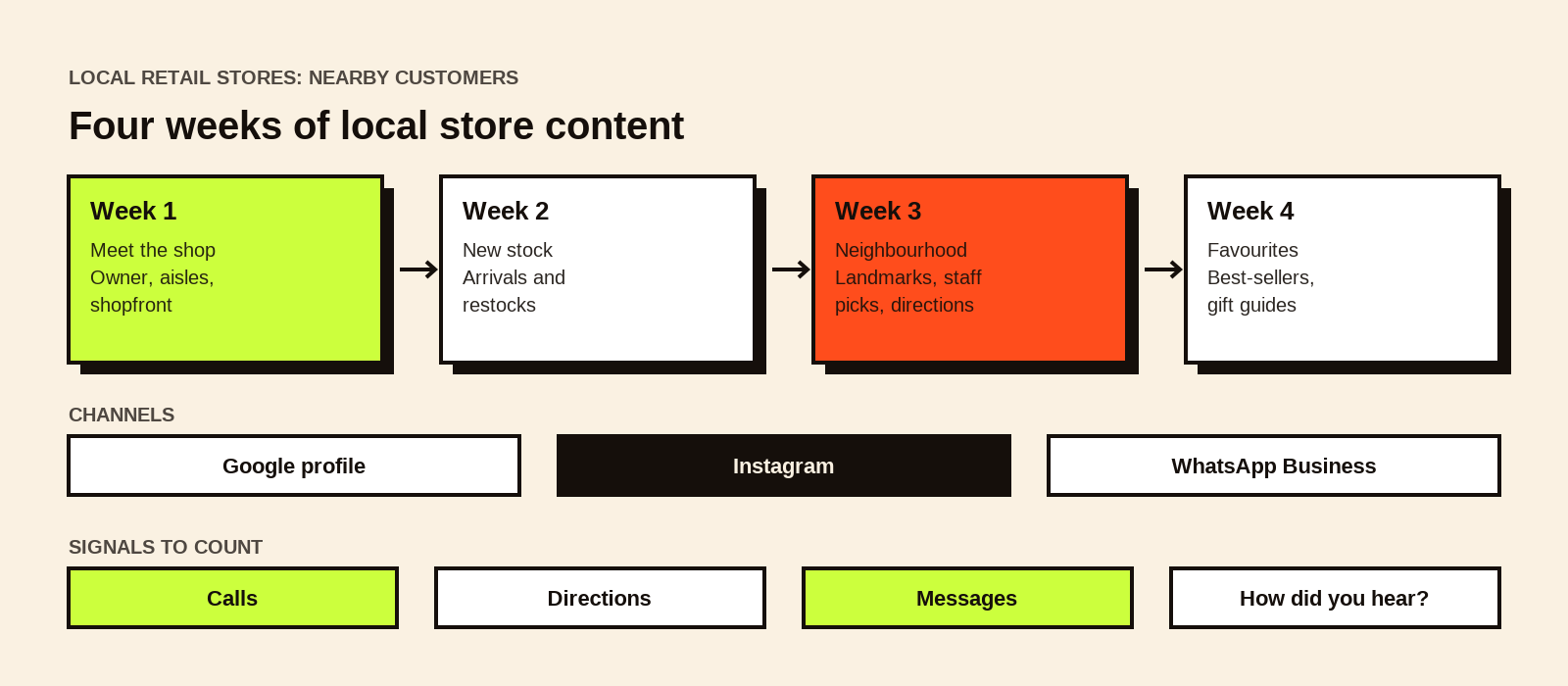
A stationery and gift shop has been on the same street for twelve years. Regulars love it, but new families in the apartment blocks two kilometres away have never heard of it and order everything online. The owner posts the occasional festive greeting on Instagram and wonders why nothing changes. The shop doesn't need to go viral. It needs the people within a short drive to know it exists, what it stocks and when it's open.
Quick answer
Social media marketing for retail stores works when it serves nearby customers. Keep your Google Business Profile accurate and active, use Instagram to show what's in store and who runs it, and use WhatsApp for quick questions and stock checks. Post around new arrivals, everyday uses, local moments and real customers (with permission). Track calls, direction requests, messages and 'how did you hear about us' at the counter, rather than likes alone.
The local discovery stack
Nearby customers find shops in a few predictable places. Each one has a different job, so a single post copied everywhere rarely works.
| Channel | Its job for a local store | What to keep updated |
|---|---|---|
| Google Business Profile | Being found when someone searches nearby, and getting directions or a call | Hours (including festival hours), photos, posts, replies to reviews |
| Showing stock, staff and the feel of the shop to people who follow or browse locally | Bio with address and hours, Highlights for categories, regular Reels and Stories | |
| WhatsApp Business | Answering 'do you have this?' quickly and sharing stock photos | Catalogue of key items, quick replies, away message with hours |
| Reaching neighbourhood groups and older customers, where they are active | Page details, events, the same hours as everywhere else |
Google Business Profile Help lists Updates, Offers and Events as post types, and WhatsApp's own help pages describe quick replies and away messages in the WhatsApp Business app, along with a product catalogue. At the time of writing (November 2026), these are free features. If Facebook is a priority for your area, our guide to Facebook Page management covers it in more depth.
Four things local customers want to know
Most local retail content answers one of four questions. If a post answers none of them, it probably isn't worth making.
- What do you have? New arrivals, restocks, categories people don't know you carry, gift ideas at different budgets.
- Is it worth the trip? Things you can only judge in person: feel, fit, colour, the range on the shelf, advice from someone who knows the stock.
- Who are you? The owner, the staff, how long you've been there, what you care about.
- How do I get there and when? Landmarks, parking, hours, festival timings, whether you take orders on WhatsApp.
A four-week local retail content plan
This plan assumes three feed posts or Reels a week, Stories on most days and one Google Business Profile post a week. Adjust the volume to what you can genuinely sustain. Swap themes around festivals or school terms, but keep the weekly rhythm so customers learn when to expect new stock.
| Week | Theme | Instagram (3 posts) | Stories and WhatsApp | Google Business Profile |
|---|---|---|---|---|
| 1 | Meet the shop | Owner intro Reel; a 'walk through the aisles' video; carousel of categories | Poll on what customers want more of; share hours and location pin | Update: who we are, hours, photo of the shopfront |
| 2 | New and back in stock | New-arrivals Reel; 'three ways to use' one product; restock post for a favourite | Behind-the-counter unboxing; WhatsApp broadcast to opted-in customers | Update with new stock photos |
| 3 | Part of the neighbourhood | Local landmark or nearby school-term moment; staff pick; how to find us from the main road | Answer a common question; share a customer photo with permission | Event post if you host a workshop or in-store day |
| 4 | Customer favourites | Best-sellers carousel; gift guide by budget; customer story with consent | 'Did you know we also stock...' series; reminder of hours | Offer post only if a real offer exists, with dates and terms |
A weekly planning template
WEEK OF: ________   THEME: ____________

Stock to feature: 1) ________ 2) ________ 3) ________
People to feature (with consent): ________
Local moment this week (festival, school term, weather, nearby event): ________

MON  Reel: ____________________  Caption ends with: address / hours / WhatsApp
WED  Post: ____________________
FRI  Reel: ____________________
DAILY Stories: stock photos, a question box or poll, opening reminder
GOOGLE BUSINESS PROFILE post: ____________________
WHATSAPP broadcast (opted-in list only): ____________________

Counter question for staff all week: 'How did you hear about us?'
Turning views into visits
A post that people enjoy but can't act on is a missed visit. Every profile and most captions should make the next step obvious.
- Name, address, phone and hours are the same on Google, Instagram, Facebook and WhatsApp.
- Festival and holiday hours are updated before the day, not after.
- Captions about specific stock say whether it's in store now and how to check (call or WhatsApp).
- Reels showing the shop include a recognisable landmark or entrance shot.
- Your Instagram bio says the area you serve, so people searching locally understand where you are.
- Product photos on WhatsApp are current, not from last season.
Reviews, customer photos and consent
Local shops depend on reviews, and it's tempting to push for them. Google's policy on fake engagement says businesses may not offer incentives such as payment, discounts or free goods in exchange for reviews, and its rating manipulation rules say merchants may not discourage negative reviews or selectively ask only happy customers. Asking every customer, with no reward and no filter, is the safe approach. Reply to criticism politely and say what you'll fix.
Photographing customers in the shop or reposting their pictures needs their permission, and a quick written yes on WhatsApp is a simple record. Be especially careful with children. Our guide to using customer testimonials and UGC covers permissions in more detail, and our article on community management vs customer support explains which questions belong in public replies and which should move to a call or message.
Offers without tricks
Offers can bring people in, but only real ones build trust. State what's included, the dates and any conditions. Don't post 'last few pieces' when the stockroom is full, and don't run a countdown that resets. The CCPA's November 2023 guidelines on dark patterns name false urgency among the practices they cover, and the same honesty is what keeps a neighbourhood shop's reputation intact.
If you run more than one store
Small chains face a choice between one brand account and separate local accounts. Keep one Google Business Profile per location with accurate details, and decide whether Instagram stays central with location tags or splits by store. Our guide to managing social media for multiple locations covers that decision, approval rules and local content ownership. If you're also thinking about local creators for a store event, our guide to retail influencer marketing covers the creator side.
Common mistakes
- Posting only festive greetings and offers, with nothing about the stock or the people.
- Different hours on Google and Instagram, so customers arrive to a closed shutter.
- Using stock images instead of photos of your own shelves.
- Chasing followers from other cities who will never visit.
- Adding customers to WhatsApp broadcast lists without asking them first.
- Never asking at the counter how people found you, so nobody knows what's working.
Where to start
This week, make your name, address, phone and hours identical everywhere, add fresh photos to your Google Business Profile and start the four-week plan. Ask every customer how they heard about you for a month. Our guide to measuring whether social media generates sales for a small business shows how to turn those answers into a simple monthly report.
For shops that want the planning and posting handled, a managed social media service like Kudozz's covers content planning, design, publishing and agreed community replies, while photo shoots and in-store customer service are scoped separately.