Creator Media Kit: How to Create a Media Kit That Gets Brand Deals
A media kit is the document a brand opens when it's deciding whether you're worth a conversation. Here's what to put in it, what to leave out, and how to keep it honest.
Most brand managers and agency planners look at dozens of creators for a single campaign. A media kit is how you make that shortlist decision easy: one document that tells them who you are, who watches you, what your content does, and how to work with you.
Quick answer
A creator media kit is a short document, usually 2 to 5 pages or one web page, that summarises your niche, audience demographics, platform performance (average views and engagement, not just followers), content examples, past brand work and contact details. Its job is to help a brand decide quickly whether you fit a campaign. Keep it current, use real numbers from your platform insights with a date on them, and decide deliberately whether to include rates.
What is a creator media kit?
A media kit (also called an influencer media kit or creator press kit) is a sales document for your channel. It is not your whole portfolio and it is not a price list. It sits between the two: enough evidence to earn a reply, short enough to read in two minutes.
Creators often confuse it with related documents. If you're unsure where one ends and the other begins, the creator portfolio guide breaks down media kit vs portfolio vs rate card vs creator website in detail. When you want to propose specific ideas to one brand rather than introduce yourself generally, use a creator pitch deck instead.
Why brands ask for media kits
- Speed: a planner comparing 40 creators needs the same information from each one in a predictable format.
- Internal approval: the person talking to you usually has to justify the choice to a manager or client. Your media kit often gets forwarded as-is.
- Audience fit: brands care most about who your audience is (city, age, gender split, language), because that decides whether the campaign reaches their buyers.
- Risk check: past collaborations and content samples show how you handle brand work and whether your content is brand-safe for them.
It helps to see the other side of the table. Brands usually follow a vetting process before they shortlist anyone, and a good media kit answers most of those questions before they're asked. See how brands vet influencers and how brands choose the right influencer for what they're checking.
What a media kit should contain
| Section | What to include | Why it matters to a brand |
|---|---|---|
| Creator bio | Name, handle(s), 2 to 3 lines on what your content is and who it's for | Tells them in seconds whether you're in their category |
| Niche and content pillars | 3 to 4 recurring themes, e.g. budget skincare, ingredient explainers, GRWM | Shows where a brand fits naturally in your content |
| Audience demographics | Top cities/countries, age ranges, gender split, main language(s) | Decides whether you reach their customer |
| Platform statistics | Followers/subscribers per platform, with the date the numbers were taken | Context for size, not the main decision factor |
| Performance | Average views per Reel/video, average reach, engagement rate with the formula you used | The number most planners actually compare |
| Content examples | 3 to 6 links or thumbnails of your best-performing and most brand-relevant posts | Proof of quality and style |
| Previous collaborations | Brand names, what you made, and a result if you have one you can share | Shows you can deliver brand work |
| Testimonials | Only real quotes, with permission, attributed to a role or company | Social proof from people who've paid you |
| Services and formats | Reels, Stories, YouTube integrations, Shorts, UGC-only, live, events | Tells them what they can actually buy |
| Contact details | Business email, phone/WhatsApp if you want it used, manager if any | Makes the next step easy |
Audience demographics
Pull demographics from your platform's native insights (Instagram professional dashboard, YouTube Studio Analytics) rather than third-party estimates. Show the top 3 to 5 cities, the dominant age bands and the gender split. For Indian creators, language matters: if 60% of your audience watches your Hindi or Tamil content, say so. Regional reach is a selling point for brands trying to grow beyond metros.
Platform statistics and engagement
Followers tell a brand how big the room is. Average views and engagement tell them how many people are actually listening. Lead with averages over a recent period (for example your last 10 to 15 Reels or last 90 days of videos) and state the period. Since April 2025 Instagram reports a unified Views metric instead of impressions and plays, so label your numbers with the metric name your dashboard uses today.
If you quote an engagement rate, say how you calculated it: engagement divided by followers gives a very different number to engagement divided by reach or views. The engagement rate guide walks through both formulas with worked examples, and creator analytics for brand deals covers which metrics are worth sharing at all.
Previous collaborations and testimonials
List brands you've genuinely worked with, paid or gifted, and be accurate about which was which if asked. If a campaign produced a result you're allowed to share (a sold-out discount code, a high save rate, a brand reusing your video as an ad), include it in one line. Only use testimonials people actually gave you, and ask before quoting a brand contact by name. Invented or inflated social proof is easy to check and ends conversations quickly.
Services and content formats
List what you offer, not what you've done once. If you make UGC-only videos for brands' own ads, say so separately from posting on your channel, because they're priced and licensed differently. If you're open to long-term ambassador work, events or live sessions, mention it.
Should you include rates in your media kit?
There's no single right answer. Both approaches are common, and the choice depends on how you want the conversation to go.
| Include rates | Leave rates out | |
|---|---|---|
| Best for | Creators with consistent formats and a clear price floor | Creators whose pricing depends heavily on rights, exclusivity and scope |
| Upside | Filters out brands who can't afford you; speeds up simple deals | Lets you price each brief properly; avoids anchoring low |
| Downside | Rates get forwarded and can become outdated or anchor negotiations | One extra email before you know if the budget is there |
| Middle ground | "Starting from" prices for core formats, with usage rights and exclusivity quoted separately | A line saying "Rate card available on request" |
Whichever you choose, keep your full pricing in a separate rate card so your media kit doesn't go stale every time you adjust a price. The influencer rate card guide shows how to structure one, and how much creators should charge covers the pricing logic behind the numbers.
A practical media kit structure
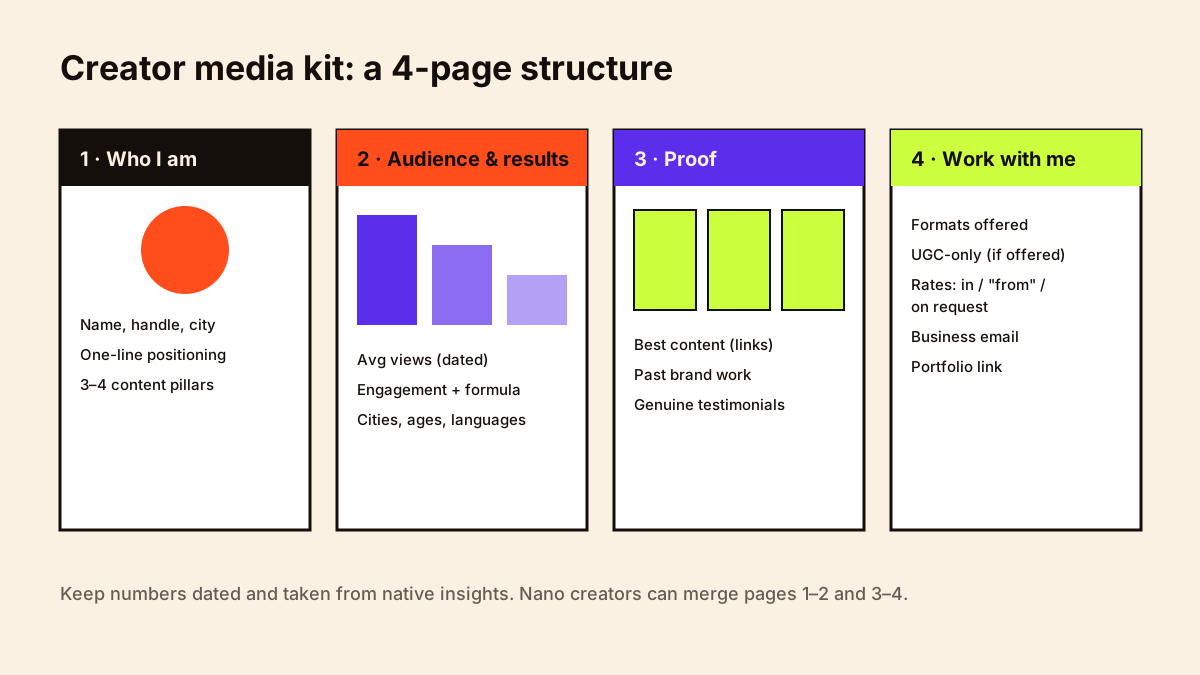
PAGE 1 — WHO I AM
• Photo, name, handle(s), city
• One-line positioning: "I make ___ for ___ who want ___."
• 3–4 content pillars

PAGE 2 — AUDIENCE & PERFORMANCE (numbers as of [month year])
• Followers/subscribers per platform
• Average views per Reel / video (last 90 days)
• Engagement rate + formula used
• Top cities, age bands, gender split, languages

PAGE 3 — PROOF
• 3–6 best content examples (links or QR codes)
• Past brand collaborations (brand, format, one-line result if shareable)
• 1–2 genuine testimonials (with permission)

PAGE 4 — WORK WITH ME
• Formats offered: Reels, Stories, carousels, YouTube integrations, Shorts, UGC-only
• Rates: included / "from" prices / on request
• Business email, phone, manager (if any)
• Link to portfolio or website
Media kit design
- Readability beats decoration. Brands skim on phones; use large numbers, short labels and plenty of space.
- Match your content's look. If your feed is minimal and neutral, your media kit shouldn't be neon.
- Use your own photos. Don't use images of other creators or stock photos that suggest work you didn't do.
- Make links clickable in the PDF and add QR codes if it may be printed or shown at events.
- Keep file size small (under a few MB) so it doesn't bounce off email attachment limits.
PDF vs online media kit
| Format | Pros | Cons |
|---|---|---|
| Easy to attach and forward; works offline; brands can save it to a campaign folder | Goes out of date the moment you send it; old versions keep circulating | |
| Online page (website, Notion, link-in-bio page) | Always current; can embed videos; one link in every pitch | Some brand teams prefer attachments; depends on the tool staying online |
| Both | PDF for formal pitches, link for DMs and bios | Two things to update |
Many creators keep an online version as the source of truth and export a dated PDF when a brand asks for one. Put the month and year in the PDF filename, for example yourname-media-kit-sep-2026.pdf.
A work-with-me page on your own site is a natural home for the online version; see how to build a creator website.
How often to update it
Update your numbers at least every quarter, and immediately after anything that changes the picture: a big jump in audience, a new platform, a strong brand campaign, or a shift in niche. Always date your stats. A brand that later checks your insights and sees lower numbers than your media kit claimed will stop trusting everything else in it.
A media kit system: keep it current without rebuilding it
Source of truth: one editable master file (not only a PDF)
Monthly (15 min): update audience numbers and date them; swap in a recent top post
After each campaign: add results to case studies; add the brand to past partners (if allowed)
Quarterly: refresh photos, bio and rate card; check every link
Share: a stable link that always points to the latest version
Keep with: bios, headshots and logos in your brand asset folder
Where bios, photos and logos live is covered in creator file management.
Do small creators need a media kit?
Yes, but it can be shorter. Nano and micro creators often have stronger engagement and a more specific audience than larger accounts, and a one or two page kit that shows this clearly can be more persuasive than a long one. If you haven't done paid work yet, replace the collaborations section with self-initiated sample content: a product you genuinely use, reviewed the way you'd do it for a brand. The first brand collaboration guide covers this in more depth.
Mistakes to avoid
- Leading with follower count and burying average views and audience data.
- Undated statistics, or numbers from your best month presented as typical.
- Engagement rate with no formula, or one calculated on a single viral post.
- Listing brands you were only gifted by as if they were paid partnerships, or brands you never worked with at all.
- Using other people's photos or content without permission.
- Ten-page designs that bury the essentials; if it takes more than two minutes to read, trim it.
- No business email. A personal DM-only contact route looks unprofessional to many brand teams.
The best media kits we receive answer three questions in the first page: who is this for, who actually watches, and what does a typical post do. Everything else is supporting evidence.— Kudozz Partnerships Team
Media kit checklist
- Positioning line that names your niche and audience
- Numbers dated with month and year, pulled from native insights
- Average views and engagement, with the formula stated
- Top cities, age bands, gender split and languages
- 3 to 6 content examples with working links
- Accurate list of past collaborations
- Formats you offer, including UGC-only if relevant
- A deliberate choice on rates (included, "from" prices or on request)
- Business email and a link to your portfolio
Once your media kit is ready, it's one part of a wider set of documents professional creators keep on hand. The creator business kit lists all ten and links to a guide for each.
Platform-specific versions: YouTube media kit for channels, and Instagram creator portfolio for making your profile match your kit.