How to Turn Instagram Profile Visitors Into Qualified Business Enquiries
How to optimise an Instagram business profile so visitors understand what you do and know how to enquire: name field, bio, links, pinned posts, Highlights, contact options, proof, the enquiry journey and DM handling.
An interior design studio's Reel gets shared widely, and its profile gets hundreds of visits in two days. The bio says 'Designing dreams since 2015'. The link goes to a homepage. Highlights are from last Diwali. A handful of people send 'price?' in DMs, and most of those messages wait three days for a reply. The Reel did its job. The profile didn't.
Quick answer
Treat your Instagram profile as a landing page. Use the name field and bio to say clearly what you offer, for whom and where. Point your links to specific pages, pin posts that answer the main buying questions, and use Highlights for FAQs, proof and how to enquire. Turn on contact options, pick one main enquiry route, and reply to DMs quickly with a qualifying question. Audit the profile every quarter.
What the profile has to do
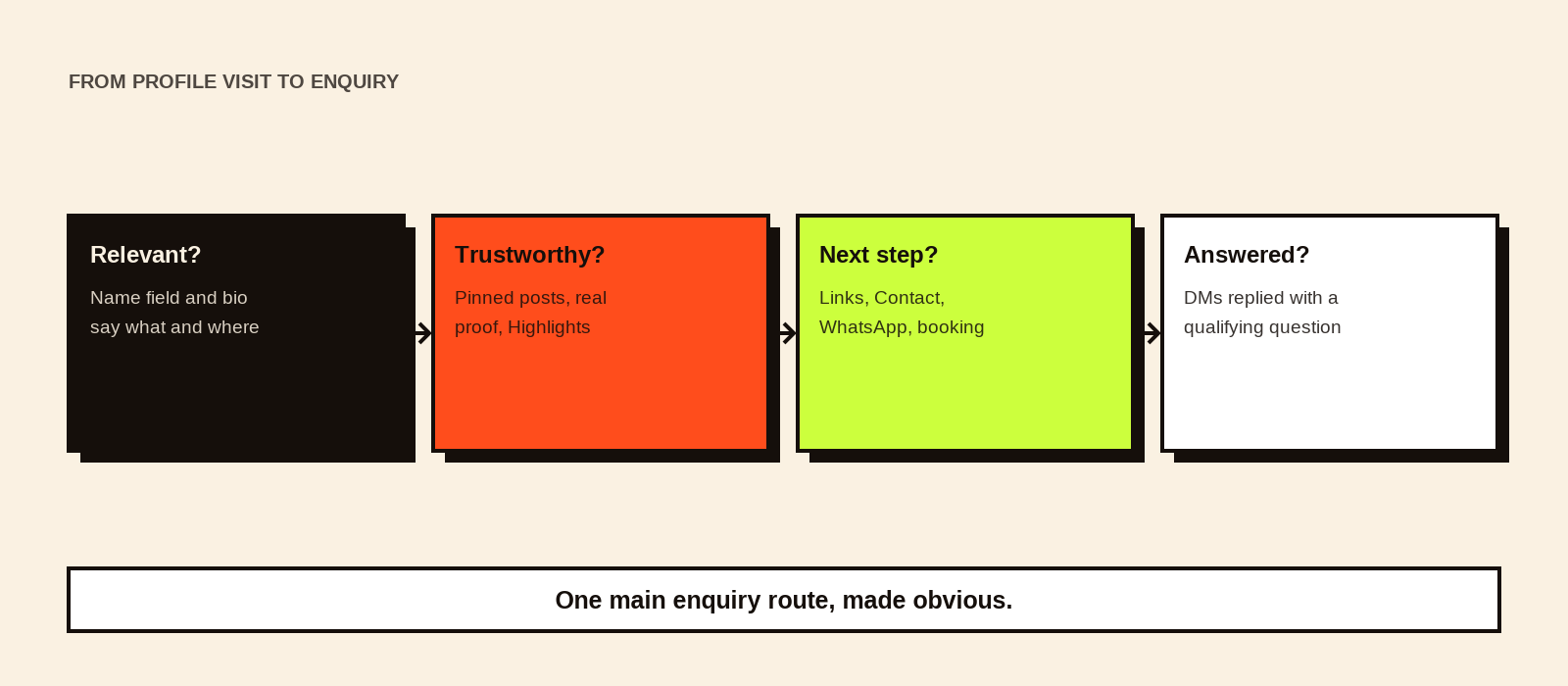
Visitors arrive from a post, a Reel, a tag or a search. Within seconds they want to know: is this relevant to me, can I trust them, and what's the next step? Every element of the profile should answer one of those questions.
Name, username, bio and profile image
Name field and discoverability
In a 2021 post explaining how search works, Instagram said the text people type is the most important search signal, and that it matches it against usernames, bios, captions, hashtags and places. It suggested using a handle or profile name related to your content, including keywords about who you are in your bio, and, for local businesses, adding your location. In practice, a name field like 'Studio Noor | Interior Design Pune' tells both people and search what you do.
Keep the username close to your brand name so customers can find you when they search for it directly. Don't stuff the name field with keywords; one clear descriptor is enough. For a deeper look at search wording, our creator-side guide to Instagram keyword strategy applies to brands too.
Bio positioning
At the time of writing (November 2026), Instagram Help says a bio can be up to 150 characters, so every line has to work. A useful pattern is: what you offer, who it's for, one differentiator or piece of proof, and what to do next.
Line 1: What you offer and where. 'Modular kitchens and wardrobes in Pune'
Line 2: Who it's for or what's different. 'For 2 and 3 BHK homes, designed in 3D first'
Line 3: Proof you can stand behind. 'In-house factory, 10-year hardware warranty'
Line 4: Next step. 'DM 'KITCHEN' for a free layout consult'
Only state proof you can back up: a real warranty, a real certification, a real years-in-business figure. Avoid 'best', 'No. 1' or 'most trusted' unless you can substantiate them.
Profile image
Use your logo, centred, with enough padding to survive the circular crop. It appears tiny in comments and DMs, so test it small, and keep it the same across platforms.
Links, pinned posts and Highlights
Links in bio
Instagram lets you add a website to your profile and, according to its help pages, add and reorder more than one link. We couldn't confirm the current maximum from an official page in November 2026, so check the Edit profile screen for what your account allows. Whatever the number, link to specific pages, such as a booking page, a product category or an enquiry form, rather than a generic homepage. Add UTM parameters so your website analytics can show traffic from Instagram.
If you use a link-in-bio page with several options, keep it short and ordered by what buyers need most. The principles in our guide to link in bio for creators carry over to brands.
Pinned posts
At the time of writing, Instagram Help says you can pin up to three posts to the top of your profile. Use them for the content a first-time visitor most needs: what you do (an overview Reel or carousel), proof (a customer story you have permission to share), and how to buy or enquire. Review them when offers change.
Highlights
Highlights keep selected Stories on your profile until you remove them. For enquiries, the most useful sets are usually FAQs, pricing or packages (if you publish them), process, reviews, work samples by category, and how to order or book. Our guide to Instagram Stories for businesses covers how to feed Highlights each week.
Contact options and action buttons
At the time of writing (November 2026), Instagram Help says professional accounts can add a Contact button near the top of the profile, showing a phone number, email or directions, and choose whether to display contact information and the category label. Anyone who taps Contact can see the details you turn on, so use a business number and email.
- Category label: choose the category that matches what you sell, since it's shown under your name if you display it.
- Email and phone: use shared business addresses and numbers that someone checks daily, not a founder's personal mobile.
- Directions: add the address only if customers actually visit, and keep it identical to your Google Business Profile.
Two further options are worth checking. WhatsApp's help centre explains how to link a WhatsApp Business account to an Instagram professional account, which adds a WhatsApp contact option to the profile. Instagram Help also describes action buttons for business profiles, such as Book Now, Reserve and Order Food, set up through third-party partners. Partner availability varies by location, so check what's offered in India for your category.
Proof, credibility and consistency
Visitors look at the grid to decide whether you're real and good at what you do. Use only real, permitted proof: customer content shared with consent, genuine reviews, work you actually did, and certifications you actually hold. Never invent testimonials or present stock images as your own work. Our guide to customer testimonials and UGC explains the permission and evidence rules.
Consistency is proof too. Recent posts in a recognisable style tell visitors the business is active. A last post from four months ago makes people wonder whether anyone will answer a DM.
Design the enquiry journey
Decide which route you want most enquiries to take, and make it the most visible one on the profile. Too many equal options split attention and make follow-up harder.
| Route | Works well for | What to set up |
|---|---|---|
| Instagram DM | Quick questions, product availability, low-ticket purchases | Saved replies, a keyword prompt in the bio, agreed reply hours |
| Businesses already selling or supporting customers on WhatsApp | WhatsApp Business linked, catalogue or quick replies, who answers | |
| Website | Ecommerce, detailed product information, pricing pages | Specific landing pages, UTM-tagged links, mobile-friendly pages |
| Enquiry form | Services, B2B, higher-value or custom work | Short form with qualifying fields, confirmation message, follow-up owner |
| Booking or ordering partner | Salons, clinics, restaurants, classes | Action button or booking link, availability kept current |
DM handling
DMs are where profile visits become enquiries or disappear. Agree who answers, during which hours, and how fast. Reply with a helpful answer plus one qualifying question, such as budget range, location, timeline or quantity, so the sales team gets context. Move serious enquiries to the agreed route and log them so you can count enquiries from Instagram each month. Complaints and order problems should go to customer support. Where that line sits is covered in community management vs customer support.
Instagram profile audit checklist
- Username matches the brand and is easy to search for.
- Name field includes the brand plus one clear descriptor (and city, if local).
- Bio states what you offer, for whom, one piece of real proof and the next step.
- Profile image is the logo, legible at small sizes and consistent across platforms.
- Links go to specific, working pages and are tagged for analytics.
- Pinned posts cover what you do, proof and how to enquire, and are current.
- Highlights are named clearly, ordered by visitor need, with no expired offers.
- Contact options, category and any action button are set up and accurate.
- Recent posts show the business is active and look consistent.
- One main enquiry route is obvious, with someone responsible for replies.
- Unanswered DMs and comments from the last week are cleared.
- Enquiries from Instagram are logged so you can compare months.
If you're reviewing every platform, not just Instagram, use the wider social media audit before changing strategy.
Common mistakes
- A bio that describes the brand's mission but not what it sells.
- Links pointing to a homepage that makes visitors search again.
- Pinned posts that are old offers or festive greetings.
- Using a personal mobile number on the Contact button.
- Unclear ownership of DMs, so replies take days.
- Claims like 'India's best' with nothing to support them.
Practical recommendations
- Rewrite the bio for a stranger who has never heard of you.
- Pick one main enquiry route and make it the obvious next step.
- Use Highlights to answer the questions your DMs ask most.
- Review pinned posts and links whenever offers, prices or locations change.
- Count enquiries from Instagram monthly, not just followers.
Profile upkeep is part of running each platform in a social media management engagement. For how we work with brands, see our brands page.
Where to start
Open your profile on a phone and look at it as a first-time visitor. Can you tell what the business offers, whether to trust it and how to get in touch within a few seconds? Fix the bio, the links and the pinned posts first, then set up a DM routine. Most of the gains come from those four changes, though no profile change can guarantee a set number of enquiries.