Social Media Management for Real Estate Developers: A Content Strategy That Builds Buyer Confidence
How real estate developers can run project social accounts that build buyer confidence: project storytelling, dated construction updates, location and amenity content, RERA disclosures, enquiry handling and an approval checklist.
A buyer who booked in your second tower last year comments under a new Reel: 'The render shows a clubhouse. When will it actually be ready?' The post was made by a designer working from the launch brochure, and nobody on the social team knows the answer. In real estate, every post is read as a promise, and buyers hold developers to it.
Quick answer
Social media management for real estate developers is mostly about accuracy. Build content around the project story, dated construction updates, location, amenities, walkthroughs and buyer education. Treat project posts as advertisements: under the RERA Act, 2016 they must carry the project's registration number and the authority's website, and states such as Maharashtra add more rules. Your legal and sales teams approve every post. An agency organises the workflow; it doesn't replace them.
Start with the rules, because they shape every post
Most social media guides put compliance at the end. For developers it has to come first, because it decides what a post may say and what it must show. This section is general information, not legal advice; confirm the position for your project with your legal team and your state authority.
What the central Act says
The Real Estate (Regulation and Development) Act, 2016 defines an advertisement broadly: any document described or issued as an advertisement through any medium, including any notice, circular or other publicity in any form, informing people about a real estate project or offering a plot, building or apartment for sale. Section 3(1) says a promoter shall not advertise, market, book, sell or offer for sale any plot, apartment or building in a project without registering it with the authority. Section 11(2) says the advertisement or prospectus issued by the promoter shall mention prominently the website address of the authority, where the project's details are entered, and include the registration number obtained from the authority.
Section 12 adds a reason to be careful with every caption: where a person makes an advance or deposit based on information in a notice, advertisement or prospectus, or on a model apartment, and suffers loss because of an incorrect or false statement in it, the promoter must compensate them under the Act. State authorities publish their own guidance too; Andhra Pradesh RERA, for example, summarises these provisions on its advertisement guidelines page.
State rules: the MahaRERA example
Maharashtra shows how far state requirements can go. MahaRERA Order No. 46/2023, dated 29 May 2023, requires promoters to display the project's QR code prominently on every project promotion or advertisement published after 1 August 2023, beside the registration number and website address, and lists social media advertisements among the media covered. Order No. 46C/2025, dated 8 April 2025, adds that the registration number and website address must be at least as large as the font used for the project's contact details, placed in the top-right quadrant in a highly visible colour, with the QR code legible and also in the top-right quadrant. The order sets out penalties for each violation.
Other states have their own orders on size, placement and format, and they change. Before you design a template, check your state authority's current orders (MahaRERA lists its orders and circulars on its website) and have your legal team confirm whether organic posts, Stories and Reels covers are treated the same way as paid ads. When in doubt, treat them the same.
The content that builds buyer confidence
Buyers are making one of the largest purchases of their lives, often over months. Content that helps them check, compare and understand does more than content that only says 'luxury living'. These workstreams cover most developer feeds:
| Workstream | What it shows | Accuracy check before posting |
|---|---|---|
| Project storytelling | Why the project exists, design intent, architect and planning choices | Every feature named is in the approved plan and the RERA listing |
| Construction progress | Dated site photos and video, completed stages | Date shown on the post; matches what the site engineer confirms |
| Location and neighbourhood | Travel routes, schools, markets, the feel of the area | No future infrastructure presented as certain; distances checked |
| Amenities | Clubhouse, open spaces, facilities, how they'll be used | Labelled as completed, under construction or planned |
| Site walkthroughs | Sample flat, site visit routes, actual views | Sample flats and renders labelled as such |
| Buyer education | Carpet area, the booking process, documents, RERA basics | General information only; no legal or financial advice |
Construction updates: accurate and dated
Progress posts are the most valuable content a developer can publish, because existing buyers and prospects both watch them closely. Put the capture date on every update, show the actual site rather than renders, and describe the stage in plain terms ('slab casting complete on floor 12', not 'nearing completion'). Under section 11(1), the promoter maintains a project webpage on the authority's website for public viewing; your social updates should never run ahead of what is reported there. Never state or imply a possession date unless legal has approved the exact wording and it matches your registered timeline.
Location, amenities and walkthroughs
Neighbourhood content works when it's specific and honest: a real drive to the nearest school at morning rush hour is more believable than a map with 'minutes away' labels. Mention a proposed metro line or road only with its official status and source, and never as a reason the property will appreciate. Label renders as artist's impressions and sample flats as sample flats. Section 12 names model apartments specifically, so what a buyer sees in a walkthrough must match what they'll receive or be clearly marked as indicative.
Platform roles for a developer
| Platform | Main job | What to post |
|---|---|---|
| Discovery and project feel | Reels of the site and neighbourhood, carousels explaining layouts and the buying process, Stories for site-visit days | |
| YouTube | Considered research | Full walkthroughs, construction progress videos, buyer education explainers |
| Local reach and existing buyer communities | Progress updates, event announcements, community posts | |
| Corporate reputation, partners and talent | Company milestones, leadership views, hiring |
For Reels specifically, our guide to an Instagram Reels strategy explains how to turn products and customer questions into a repeatable series. For working with local property creators on top of your own channels, see influencer marketing for real estate brands, which covers creator selection and disclosure.
The enquiry journey: who answers, and how fast
Social media for developers generates enquiries through comments, DMs, lead forms and WhatsApp click-to-chat links. The weak point is almost always the handover. Decide who owns each channel before you publish anything that invites a response.
- Comments asking general questions: the social team answers with approved replies and points to the right channel
- Price, availability, offers or payment plans: always handed to the sales team, never quoted by the social team
- Existing buyer complaints or possession questions: routed to customer relations, with a holding reply
- DMs and WhatsApp: one named sales owner per project, with a target response time
- Lead forms: connected to the CRM with the project and source recorded
- Anything that sounds like a legal dispute: escalated to legal, not debated in comments
Write the approved replies once and update them when prices, phases or timelines change. Our guide to community management vs customer support explains where the social team's role ends and the business's begins.
How an agency organises approvals
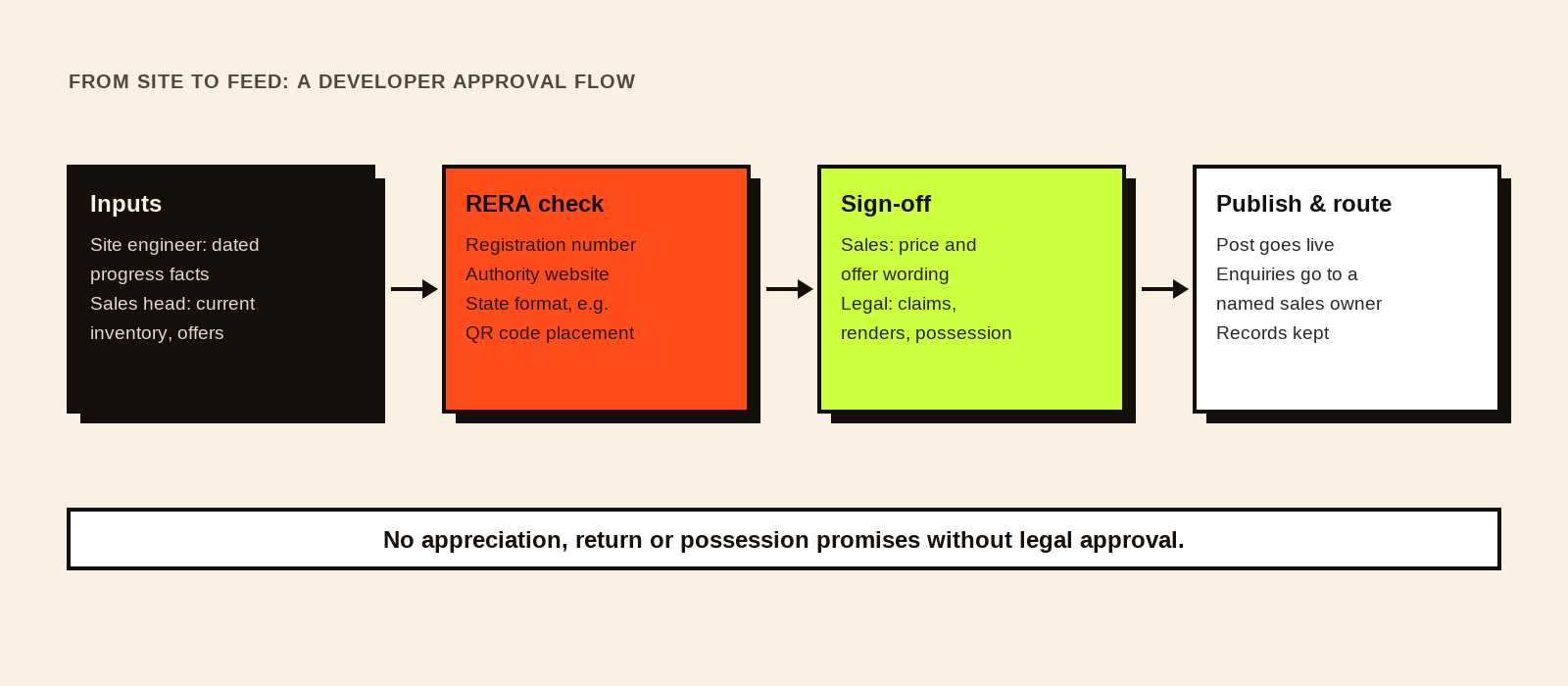
An agency or social media manager can draft, design, schedule and route content, but it cannot know whether a clubhouse will be ready in March or whether a disclosure format meets your state's latest order. The developer's own team decides those. A workable approval chain looks like this:
| Stage | Who | What they check |
|---|---|---|
| 1. Inputs | Site engineer, sales head | Progress facts, dates, current inventory and offers |
| 2. Draft | Social team or agency | Copy, design and the disclosure template |
| 3. Sales review | Sales or marketing head | Pricing, availability and offer wording (or their removal) |
| 4. Legal sign-off | Developer's legal or compliance owner | RERA details, claims, possession wording, renders |
| 5. Publish and route | Social team | Posting, then enquiries to named owners |
Keep a record of who approved what and when. The broader process, with turnaround times, is covered in our social media content approval process guide.
Pre-publish compliance and approval checklist
Run every project post, Reel cover, Story and ad creative through this before it goes live. It's a working checklist, not a legal standard; adapt it with your legal team.
- The project is registered with the state authority before any promotion
- Registration number and authority website shown prominently, in your state's current format
- QR code, size and placement rules met where your state requires them (in Maharashtra, the top-right quadrant)
- Every amenity, specification and area figure matches the approved plan
- Renders labelled as artist's impressions; sample flats labelled as such
- Construction photos dated and taken on the actual site
- No possession date unless legal has approved the exact words
- No appreciation, rental yield or return claims of any kind
- No price, offer or payment plan unless sales has approved it for this post and date
- Location distances and travel times checked; proposed infrastructure shown with its official status
- People in the content have given written consent
- Sales and legal sign-off recorded with the date
Common mistakes
The most expensive mistakes are small ones repeated across dozens of posts: a registration number in faint grey at the bottom of every creative, renders posted without a label, or a caption saying 'ready soon' that buyers screenshot later. Others are about tone: 'investment opportunity' language that implies returns, comparisons with competitors' projects, and deleting critical comments instead of answering them. Use one disclosure template per project, built to the strictest current rule in your state, so designers don't recreate it from memory each time.
Where to start
Before planning content, build three things: a disclosure template per project, an approval chain with named people, and an enquiry routing sheet. Then start with dated progress updates, which buyers value most and which are easiest to keep accurate. Our companion guide on real estate social media marketing maps what to post at each stage of the buyer journey.
If you work with an outside team, a managed social media service like Kudozz's can run the calendar, creative, publishing and comment handling within an agreed scope, while every claim and disclosure is signed off by your sales and legal teams.