Social Media for Amazon and Flipkart Sellers: Building a Brand Beyond the Marketplace Listing
How marketplace sellers can build their own social presence: which content supports a listing, how it connects to Amazon brand tools, and how to keep prices, offers and claims consistent across channels.
A kitchenware seller has 400 ratings on one marketplace, a steady ranking and a listing that converts. Then a near-identical product appears at a lower price, and shoppers start asking in the questions section whether the two are the same. Nothing on the listing explains who the seller is, why the steel is a different grade, or how the product is used day to day. The listing sells, but it doesn't build a brand that shoppers search for by name.
Quick answer
Social media marketing for Amazon sellers and Flipkart sellers is about building a brand that shoppers recognise before they reach the listing. Use social to explain the product, show it in use, answer pre-purchase questions and introduce the people behind it. Map each listing element to social content, link to your brand store or product page, and keep prices, offers and claims consistent everywhere, because a mismatch between channels costs trust faster than any post can build it.
What a listing can't do on its own
A marketplace listing is built for a shopper who is already searching. It answers the questions it has room for and sits next to competitors on the same page. Social media works earlier and later in the journey: before someone searches, and after they have bought and want to know how to use, care for or reorder the product.
- Brand recall: a shopper who has seen your Reels may search for your brand name rather than the generic product term.
- Explanation: a 30-second demo shows texture, size and use better than a seventh listing image.
- Questions: comments and DMs reveal objections you can answer on the listing too.
- After purchase: care, setup and usage content cuts confusion and supports repeat orders.
- Resilience: if a listing is suppressed or a competitor copies your images, your brand presence and customer relationships still exist.
None of this guarantees sales. It gives shoppers more reasons to choose you when they compare, and it gives you a place to talk to customers that you control.
Start from the marketplace tools you already have
Amazon's official seller site for India describes Brand Registry as the enrolment that gives brand owners access to tools for protecting and building their brand. It describes A+ Content as a way to show your brand story and product features with rich text and images on the detail page, and Stores as a free, self-service branded destination on Amazon where you curate your products and content. Eligibility depends on your trademark position and account type, so check the current requirements in Seller Central before planning around them.
Flipkart offers its own seller tools through Seller Hub. Features and eligibility change, so we haven't listed them here; check what your account has access to before you plan content that depends on a specific feature. The principle is the same on both: your social content and your on-marketplace brand content should tell one story, with the same claims, visuals and tone.
The listing-to-social content map
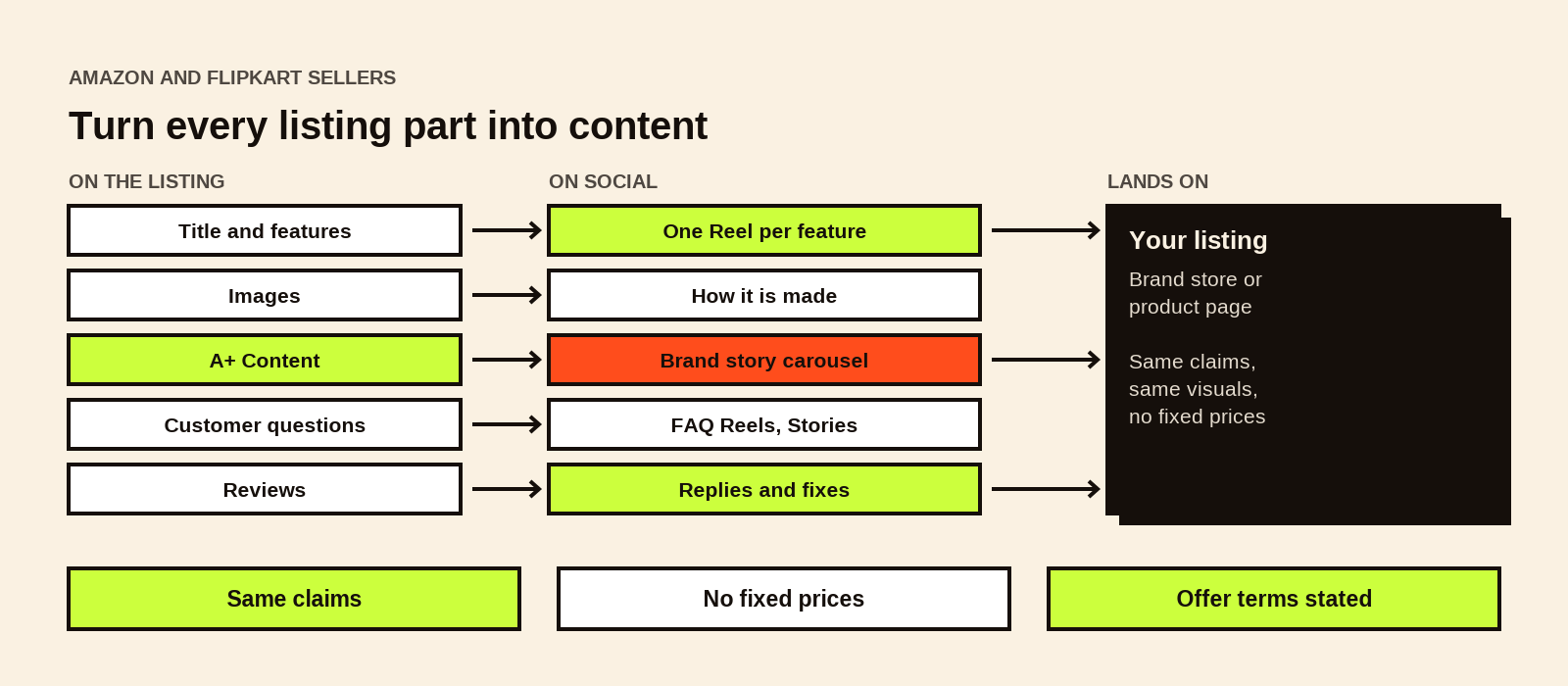
The quickest way to plan is to take each part of your best listing and ask what social content would make it more convincing. Then ask what you learn on social that should go back onto the listing. Use this map as a starting worksheet for each hero product.
| Listing element | Social content that supports it | What flows back to the listing |
|---|---|---|
| Title and key features | One Reel per feature, shown in use, not read out | Feature order based on which ones people ask about most |
| Main and gallery images | Behind-the-scenes on how the product is made or packed | Images that answer common doubts (size in hand, inside view) |
| A+ Content or brand modules | Brand story carousel, founder intro, material explainer | The same story in shorter words, so the two match |
| Size, fit or compatibility details | Comparison clips, 'which size do I need' carousels | Clearer size charts and compatibility notes |
| Customer questions section | FAQ Reels and Stories answering recurring questions | Updated bullets and descriptions that pre-empt the question |
| Ratings and reviews | Responses to recurring feedback, fixes you have made | Product or packaging changes, stated accurately |
| Brand store | Collection posts that link to the matching store page | Store sections that mirror how social audiences browse |
For the production side of explainers, our guide to D2C product content that answers questions before purchase covers demos, comparisons and unboxing formats in depth.
What to post, week to week
Marketplace sellers usually have strong product knowledge and weak storytelling habits. A simple rotation keeps the account useful without demanding new ideas every day.
- Product in use: short demos filmed in real homes, offices or kitchens, not only on a white background.
- How it's made or sourced: only what you can show and substantiate.
- Care and setup: the instructions people skip in the box, turned into 20-second clips.
- Range navigation: how two of your own products differ and who each one suits.
- Customer voice: reviews or photos shared with the customer's permission, never edited to change their meaning.
- People: the founder, the packing team, the person who answers queries.
If you want creators to make some of this content, that is a separate programme. Our playbook on influencer marketing for Amazon and Flipkart sellers covers the creator side; this article stays on your own accounts.
Where social traffic should land
Decide the landing point by the job of the post. A post about one product should go to that product page. A post about a range or the brand should go to the brand store or a collection. If you also sell on your own website, decide whether social traffic goes there or to the marketplace, and be consistent so you can read the results. Our comparison of where to send traffic when you sell on your site, marketplaces and quick commerce walks through that choice.
Attribution from social to a marketplace sale is imperfect. Use whatever attribution tools your marketplace seller programme offers to your account, where available, and treat brand-name searches, store visits and direct questions as supporting signals rather than proof.
Channel conflict and pricing consistency
Sellers on several marketplaces, plus a website and perhaps quick commerce, often show different prices at different times. Some of that is outside your control because marketplace sale events, platform offers and bank discounts vary. Social media makes the gaps visible. A Reel that says 'only ₹799' is wrong the moment a marketplace price changes, and a customer who paid more elsewhere will say so in the comments.
- Avoid hard-coding prices in evergreen posts. Say 'see today's price on the listing' instead.
- When you do run an offer, state where it applies, the dates and any conditions. Don't invent a 'was' price.
- Don't create fake urgency. The CCPA's guidelines on dark patterns (November 2023) name false urgency, drip pricing and bait and switch among the specified dark patterns.
- Keep claims identical across channels. Under the ASCI Code, claims about objectively ascertainable facts must be capable of substantiation, so 'food-grade', 'BPA-free' or 'handmade' need evidence wherever they appear.
- If authorised resellers sell your products, tell them what you will post and when, so a social offer doesn't undercut a partner without warning.
Read the CCPA's guidelines on dark patterns and the ASCI Code before you write offer copy, and keep your substantiation file somewhere the social team can see it.
Channel-consistency checklist
CHANNEL-CONSISTENCY CHECK
Product / range: ____________   Date: ________

[ ] Product name matches the listing title wording
[ ] Images match the current pack and variant (no old packaging)
[ ] Every factual claim is on the substantiation list
[ ] Claims match A+ Content / brand modules word for word in meaning
[ ] No fixed price in evergreen posts
[ ] Offer posts state: where it applies, start and end dates, conditions
[ ] Offer is live on the linked channel before the post goes out
[ ] Link goes to the right product page or brand store section
[ ] Stock checked on the channel you are linking to
[ ] Resellers or partners informed if the offer affects them
[ ] Bio, store name and logo consistent across Instagram, Facebook, YouTube and marketplaces
[ ] Customer content used with written permission on file
Reviews: what to encourage and what to avoid
Social media can remind happy customers that reviews help small brands. Each marketplace has its own rules on how sellers may request reviews, so read them in your seller account before you post. Never offer rewards for reviews unless the marketplace allows it and the reward is disclosed, never ask only satisfied customers, and never remove or bury genuine criticism. Reply to recurring complaints publicly with what you have changed. For the boundary between community replies and order support, see our guide on community management vs customer support.
Common mistakes
- Posting the listing images on Instagram unchanged. Social needs motion, context and people.
- Writing prices into captions that outlive the price.
- Claiming things on social that the listing doesn't say, or the other way round.
- Sending every post to the homepage of the brand store, so nobody lands on the product they saw.
- Measuring only followers, when brand-name searches and questions are closer to sales.
- Ignoring comments that ask 'is this the same as the cheaper one?', which is exactly where brand content earns its place.
Where to start
Pick your two best-selling products, fill in the listing-to-social map for each, and plan four weeks of posts from it. Run the consistency checklist before anything goes live, and feed what you learn in comments back onto the listing every month.
If you'd rather hand over the calendar, design and publishing, our social media management scope covers planning, creative and reporting for a brand's own accounts, while marketplace advertising stays a separate job.