Social Media Management for Manufacturing Companies: Making Industrial Expertise Visible to Buyers, Partners and Talent
How manufacturers can run their own social accounts for four audiences at once: buyers, distributors, skilled talent and the local community, with a content planning matrix and the approvals shop-floor content needs.
Your plant has just cleared a customer audit, a new machining line is running, and the sales team is packing for an industrial exhibition next month. The company LinkedIn page, meanwhile, last posted a festival greeting and a stock photo of a factory that isn't yours. The expertise is real. Buyers, distributors and job seekers just can't see it.
Quick answer
Social media management for manufacturing companies means showing buyers, distributors and skilled candidates what your plant actually does, with approvals built in. Plan content by audience: process and quality proof for procurement teams, product and training updates for dealers, safety culture and career paths for talent, and local updates for the community. Use LinkedIn as the base, YouTube for process video, and post only certifications, capacities and claims the company can verify today.
Who you're really posting for
A manufacturing company rarely has one audience. A procurement manager comparing three vendors, a dealer deciding which brand to push this quarter, a diploma engineer choosing between two job offers and a family living near the plant may all look at the same page, for very different reasons. Planning starts with what each of them needs to see.
| Audience | What they want to know | Content that answers it |
|---|---|---|
| Buyers and procurement teams | Can you make it consistently, to our standard and at our volumes? | Process explainers, quality checks, capability posts, certifications you hold, application notes |
| Export buyers | Can we trust a supplier we may not visit before the first order? | Clear capability overviews, standards you work to, exhibition schedules, plant walkthrough video |
| Distributors and dealers | Is this brand easy to sell, install and support? | Product updates, installation tips, training clips, approved scheme posts, partner recognition |
| Skilled talent | Is this a safe, well-run place to learn and grow? | Training and apprenticeship posts, safety practices, supervisors explaining a skill, career paths |
| Local community | Is the plant a good neighbour? | Local hiring drives, plant visit days, environment and CSR updates the company has verified |
A content planning matrix for manufacturers
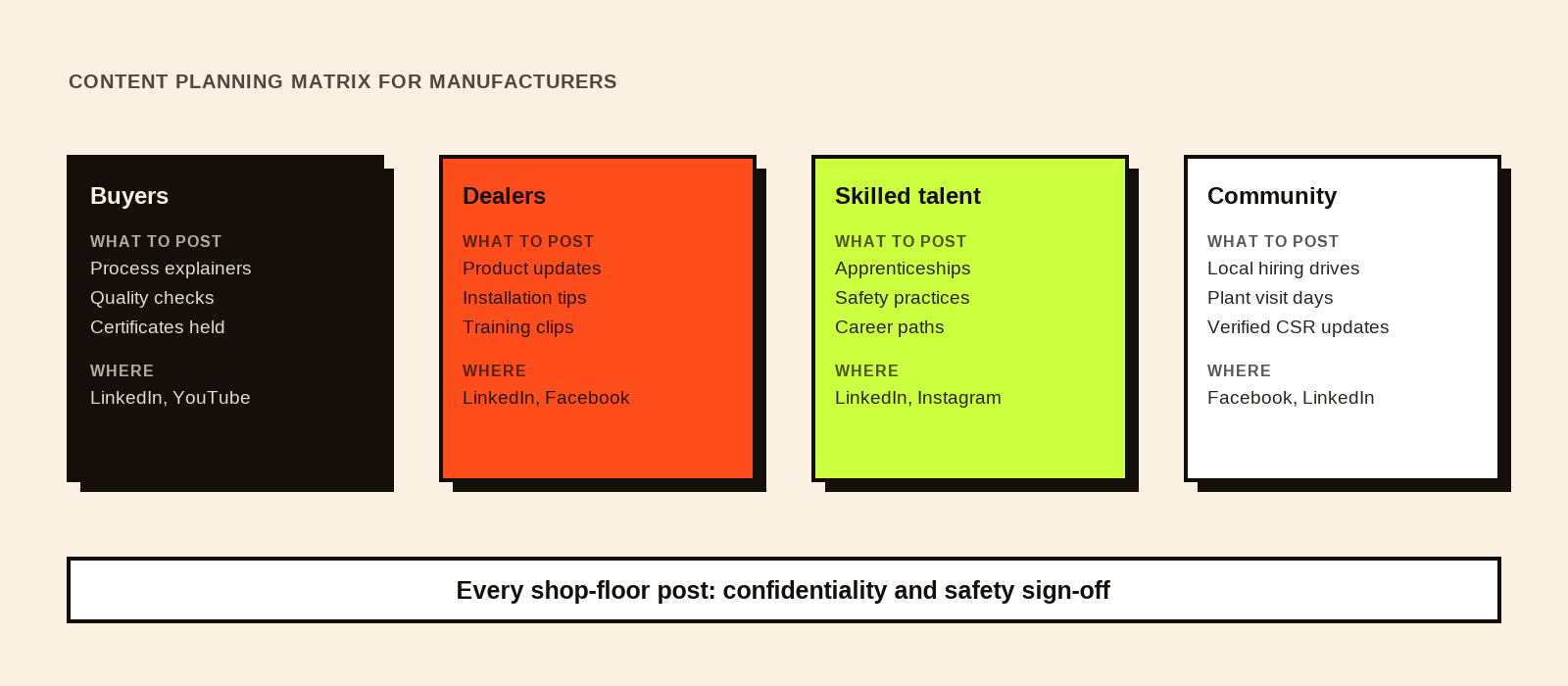
Use this matrix to plan each month. Every row is an audience; the columns tell you what to make, where it goes, who supplies the facts and who approves it. A small team doesn't need to fill every row every month. Pick two audiences to prioritise each quarter and keep the others ticking over.
| Audience | Content types | Main platforms | Supplied by | Approved by |
|---|---|---|---|---|
| Buyers and procurement | Process explainers, inspection clips, application notes, capability posts | LinkedIn, YouTube | Production, quality, applications engineering | Plant head and quality head |
| Export buyers | Capability overviews in plain international English, standards, exhibition updates | LinkedIn, YouTube | Export sales, quality | Export head and quality head |
| Distributors and dealers | New product notes, installation tips, training video, scheme announcements | LinkedIn, Facebook | Sales and service teams | Sales head |
| Skilled talent | Training, apprenticeships, safety practices, team stories with consent | LinkedIn, Instagram | HR, plant supervisors | HR and the safety (EHS) lead |
| Local community | Hiring drives, plant visit days, verified environment and CSR updates | Facebook, LinkedIn | Admin and CSR teams | Management |
How to use the matrix each month
- Start from this quarter's business priority: a new product, an exhibition, a hiring push or a new export market.
- Choose the two rows that serve that priority and plan most posts there.
- Book one shop-floor capture session a month instead of filming whenever someone remembers.
- Give every post a fact owner and an approver before design starts, not after.
- Review what each audience actually did: questions from buyers, dealer requests, job applications, not only likes.
Plant and process storytelling, with confidentiality and safety sign-off
The shop floor is your most persuasive content, and also the riskiest. A clip of a press line or an inspection bench shows buyers more than any brochure. But customer parts, drawings, tooling and process settings may be covered by confidentiality agreements, and a video showing someone without the right protective equipment can undo years of safety work in a single post.
So plant content needs a clear sign-off chain: the plant or production head for what can be shown, the quality head for technical claims, the safety lead for anything filmed on the floor, and sales when a customer's part or programme could be identified. How to set up stages and turnaround times is covered in our guide to the social media content approval process.
Checklist: before you film on the shop floor
- Confirm which customer parts, drawings, moulds and fixtures are covered by confidentiality agreements, and keep them out of frame.
- Check screens, whiteboards, job cards and labels for customer names, part numbers and process settings.
- Ask the safety lead to confirm that everyone in frame follows the plant's protective equipment and safety rules.
- Don't show shortcuts, removed guards or unsafe handling, even in casual behind-the-scenes clips.
- Ask employees before filming them, and make it easy for them to say no.
- Have the plant or quality head check every technical claim in the caption.
- Record who approved each post and when.
Employees' faces and names are personal data. India's Digital Personal Data Protection Act, 2023 now has rules in place: the government notified the DPDP Rules in November 2025 with phased compliance, according to the Press Information Bureau. Agree with HR and your legal adviser how consent for workplace photos and videos is collected, recorded and withdrawn.
Quality, certifications and capacity claims
Buyers notice certifications, and serious buyers check them. Post only certificates the company currently holds, name the standard and its scope accurately (which site, product range or process it covers), and update or remove posts when a certificate lapses or the scope changes. A quality management system certificate, such as one to ISO 9001, is about how the organisation manages quality. It isn't a product approval, and captions shouldn't blur the two.
Treat capacity, tolerances, test results, customer lists and export destinations the same way: if sales and quality can't show a document behind it, it doesn't go in a post. Certification bodies and product-mark schemes often have their own rules on how marks and logos can be displayed, so check those before a mark appears on a creative. A simple certificate register, with expiry dates and approved wording, saves a lot of last-minute questions.
Turning technical documents into posts
Datasheets, installation manuals and application notes are full of useful content, but they're written for someone who is already evaluating you. Social media can pull one useful idea out of each document and make it readable in a minute.
| Source document | Social format | What to check first |
|---|---|---|
| Product datasheet | Carousel on how to read the key values, or a document post | Values match the current revision |
| Installation manual | Short video of one installation step | Safety warnings stay intact |
| Application note | Post explaining which grade suits which application | Applications engineer signs off |
| Inspection procedure | Clip of one inspection step with a plain-language caption | No customer parts or data visible |
| Sales FAQ | Text post or short video answering one question | Sales head confirms the answer |
| Maintenance schedule | Checklist graphic for dealers and end users | Matches the manual exactly |
LinkedIn lets Pages upload documents to posts. At the time of writing (November 2026), its Help Centre lists PDF, PPT, PPTX, DOC and DOCX files of up to 100MB and 300 pages. In practice, a short, designed document of a few pages tends to be easier to read on a phone than a full catalogue upload.
Trade shows, exhibitions and export buyers
An exhibition is one of the few moments when buyers, dealers and competitors are all paying attention to your category at once. Treat it as a short campaign rather than a single 'visit us at stall' post.
- A few weeks before: announce the stall location, what you'll display and which engineers or managers will be there.
- During the show: post short clips of live demos the same day, and film visitors only with their agreement.
- After the show: share a recap, then answer the questions visitors asked in posts over the following weeks.
Export buyers may never visit the plant before a first order, so your page often stands in for that visit. Write in clear international English, use the units and standards the buyer's market expects, and list export markets only if sales confirms the list is accurate and shareable. If divisions serve very different markets, LinkedIn Showcase Pages can give a business unit its own page. LinkedIn's Help Centre says only a super admin of the parent Page can create one, with up to 25 per Page at the time of writing. Page setup and admin roles are covered in LinkedIn company page management.
Distributors, dealers and skilled recruitment
Supporting the distribution network
Dealers and distributors want material they can use: approved product images, short explainer clips, installation tips and launch announcements they can reshare. Public posts can recognise partners (with their permission), announce new territories once agreements are signed, and show training sessions. Keep prices, margins and scheme terms out of public feeds unless sales has approved them; dealer-only information belongs in your dealer communication channels.
Recruiting skilled people
Machinists, welders, maintenance technicians, quality inspectors and engineers judge a plant on safety, training and growth. Show apprenticeship and training programmes, supervisors explaining a skill, and real career paths from operator to supervisor, with consent from everyone shown. Many candidates for shop-floor roles may respond better to Hindi or a regional language than to corporate English. Our guide to social media employer branding covers recruitment content in more depth.
Common mistakes
- Posting only greetings, awards and dignitary visits.
- Using stock photos of factories that aren't yours.
- Filming customer parts or drawings without checking confidentiality agreements.
- Showing missing protective equipment or unsafe handling in casual clips.
- Listing certifications that have lapsed, or overstating their scope.
- Writing captions only engineers understand, or so vague that nobody learns anything.
- Treating a trade show as one post instead of a few weeks of content.
Practical recommendations
- Name one owner in marketing and one technical reviewer in the plant.
- Run one monthly capture session with a shot list built from the matrix.
- Keep a certificate and claims register with expiry dates and approved wording.
- Build a backlog of posts from your ten most-used datasheets and sales FAQs.
- Plan each exhibition as a campaign, with posts before, during and after.
Your own channels and creator partnerships do different jobs. Industrial educators, engineers and trade creators who already have an audience can explain your products to people your page doesn't reach yet; influencer marketing for manufacturing brands covers how that works. This guide is about the accounts you run yourself. For the wider B2B content system behind them, see our B2B social media strategy guide.
If your plant team can supply footage and facts but nobody has time to plan, design and publish, Kudozz's social media management for industrial teams covers content planning, creative, editing and publishing, with shoots scoped separately.
Where to start
List the two audiences that matter most this quarter, fill their rows in the matrix, and book one shop-floor session with your safety and quality leads present. Start a certificate register before you post a single badge.
Manufacturing content earns trust when it's specific, accurate and approved by the people who run the plant. Do that consistently and buyers, dealers and candidates will see the company your customers already know.