How Restaurants Can Manage Customer Comments, Reviews and Complaints on Social Media
How restaurants can handle comments, reviews and complaints across Instagram, Google and delivery apps: who owns each channel, response examples for eight common scenarios, an escalation table and what Google's review policies allow.
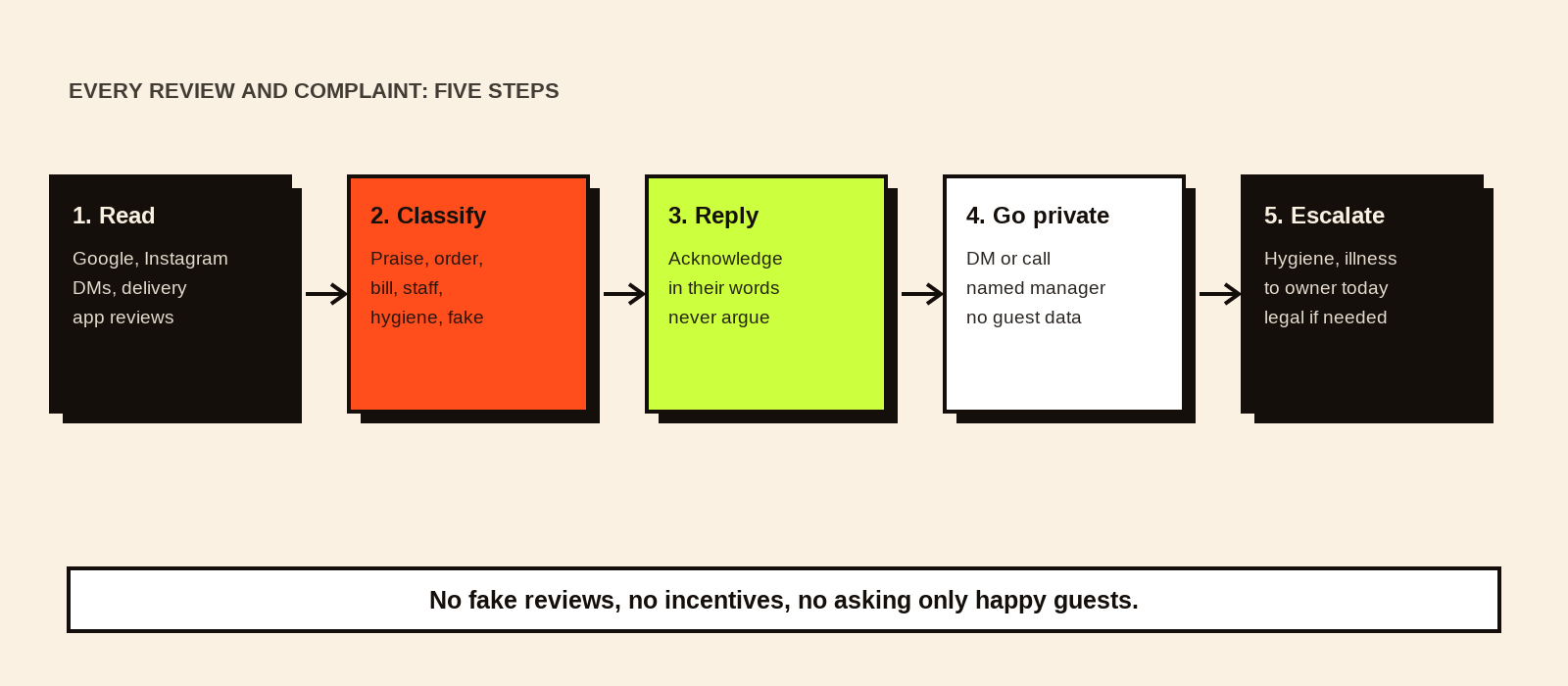
Saturday, 10:40 pm. A one-star Google review says the biryani was cold and the manager was rude. An Instagram comment under your latest Reel asks why the delivery order was missing a dish. And a DM from a stranger claims a family member fell ill after eating with you last night. All three need a reply, but not the same reply, and not from the same person.
Quick answer
Restaurant social media reputation management comes down to three things: knowing who owns each channel, replying to every review and complaint with a calm public acknowledgement that moves details to a private channel, and escalating hygiene, illness and legal issues to the owner immediately. Never fake, buy or incentivise reviews, never ask only happy guests, and report fake reviews through the platform instead of arguing in public.
Where feedback arrives and who owns it
Feedback for a restaurant is spread across channels the restaurant only partly controls. Decide who watches each one and how quickly. The targets below are practice suggestions for a single restaurant, not platform rules.
| Channel | Typical feedback | Owner | Suggested reply target |
|---|---|---|---|
| Google reviews | Ratings and detailed reviews of visits | Owner or manager, drafted by the social team | Within one to two days |
| Instagram comments | Questions, praise, public complaints | Social team or community manager | Same day during working hours |
| Instagram and Facebook DMs | Bookings, complaints, private issues | Named inbox owner, with a manager for complaints | Same day |
| Delivery app reviews and chats | Missing items, late or cold food, packaging | Manager who handles the delivery partner account | As the app's own process allows |
| Facebook page reviews and comments | Similar to Google, often older regulars | Social team | Within one to two days |
Where social media community management ends and customer support begins is a decision in itself; our community management vs customer support guide sets out how to draw that line and build an escalation matrix.
Five rules for every reply
- Acknowledge the specific issue in the guest's words. Generic 'sorry for the inconvenience' replies read as copy-paste.
- Never argue facts in public, even when the guest is wrong. Offer to look into it.
- Move details to a private channel: a phone number, DM or email, with a named person.
- Never post a guest's bill, order number, phone number or CCTV stills publicly.
- Sign off as a real person or role (for example, 'Ritu, Manager') so the guest knows someone owns it.
On Google specifically, Business Profile Help says the reviewer is notified when you reply, and replies are checked against Google's content policies before they appear. That review usually takes minutes but can take longer, and you can edit or delete your reply later. Reviewers can also update their review after reading your response, which is one more reason to reply well.
Response examples by scenario
These replies are starting points, not scripts. Adapt them to your voice and the guest's actual words. Names and details are placeholders.
1. Wrong or late order at the table
Hi [name], thank you for telling us, and we're sorry your [dish] came out wrong and you had to wait for the replacement on [day]. That isn't the experience we want for anyone. I've shared this with our kitchen team. Could you send us a DM or call [number] and ask for [manager's name]? We'd like to hear exactly what happened and put it right.
[Name], Manager
2. Delivery app issue (missing item, cold food, late delivery)
Hi [name], sorry your order was missing the [item]. That's frustrating, especially when you're hungry. For delivery orders, refunds and replacements go through the app's own help section, so please raise it there if you haven't already. We've also checked our packing for that order and briefed the team. If the app doesn't resolve it, DM us your order date and time (not your phone number) and we'll follow up.
[Name], [Restaurant]
Delivery platforms run their own refund, rating and support processes, and these vary by app. Don't promise refunds the app controls; describe what you can do yourself.
3. Hygiene complaint or foreign object (escalate)
Hi [name], thank you for raising this. We take it very seriously and our owner is looking into it personally today. Please could you DM us or call [owner's number] so we can get the details and any photos, and speak to you directly?
[Name], Owner
Don't deny, explain or blame in public, and don't make hygiene or safety claims ('our kitchen is 100% hygienic') that you can't substantiate. Capture the post and any photos, check the kitchen and supplier records for that service, and decide the next step with the owner.
4. Illness claim after a meal (escalate immediately)
Hi [name], we're very sorry to hear [you / your family member] felt unwell, and we hope [you're / they're] recovering. Our owner would like to speak to you directly. Please call [number] or DM us your contact details so we can understand what happened.
[Name], Owner
Illness claims are a potential crisis, not a community management task. Don't speculate about the cause, admit liability or dismiss the claim in public. The owner takes over, and for anything serious, take legal advice. Our social media crisis plan covers severity levels and holding statements.
5. Price or bill dispute
Hi [name], thanks for flagging this. We're sorry the bill wasn't what you expected. We want to check it properly: please DM us the date and time of your visit and [manager's name] will go through the bill with you. If we got something wrong, we'll fix it.
[Name], Manager
Many bill disputes start with an offer post or menu that left out taxes, charges or conditions. Check the post the guest saw, and fix it if it was unclear.
6. Rude or unhelpful staff
Hi [name], we're sorry. Everyone who visits should be treated with courtesy, and what you've described falls short of that. I'm speaking with the team about your visit on [day]. I'd also like to hear from you directly: please call [number] or DM us.
[Name], Manager
Never name or blame individual staff in public, and don't debate their side in the comments. Deal with it internally.
7. Positive review
Thank you, [name]! So glad you enjoyed the [dish they mentioned] and that [server's first name, if they named them] looked after you well. We'll pass your note to the kitchen. See you again soon.
[Name], [Restaurant]
Mention something specific from the review. If you want to reshare a positive review or customer photo on your own feed, ask first and keep it unedited; our customer testimonials guide covers permission and evidence rules.
8. Suspected fake or competitor review
Hi [name], we take every review seriously, but we can't find a visit or order matching what you've described. If you did visit us, please call [number] or DM us with the date and time so we can look into it properly.
[Name], Manager
Keep this reply factual and polite, then report the review through the platform. Don't accuse the reviewer of working for a competitor in public; readers see the accusation, not your evidence.
Escalation table
| Scenario | Severity | First response | Escalate to | Public reply? |
|---|---|---|---|---|
| Positive review or praise | Low | Social team replies | No one | Yes, specific thank-you |
| Question about menu, hours, booking | Low | Social team answers | Manager if unsure | Yes |
| Wrong or late order (dine-in) | Medium | Manager reply and private follow-up | Owner if repeated | Yes, short acknowledgement |
| Delivery app issue | Medium | Point to app support; check packing | Manager handling the app account | Yes, short acknowledgement |
| Bill or price dispute | Medium | Manager checks bill privately | Owner if an offer post was unclear | Yes, short acknowledgement |
| Rude staff | Medium to high | Manager reply; internal review | Owner | Yes, apology without naming staff |
| Hygiene complaint or foreign object | High | Holding reply within hours | Owner the same day; legal if needed | Holding reply only |
| Illness claim | High | Holding reply within hours | Owner immediately; legal advice | Holding reply only |
| Fake or competitor review | Medium | Factual reply; report via platform | Owner decides on appeal | Brief, neutral |
| Abuse, threats, hate speech | High | Hide or report; don't engage | Owner; police if threats | No |
| Media or viral post | High | Pause scheduled posts | Owner and crisis plan | Agreed statement only |
Fake reviews, gating and what the platforms allow
Google's Maps user-generated content policy is explicit, and worth reading in full. At the time of writing (November 2026), it says fake engagement is not allowed and will be removed, including paid reviews and content based on a conflict of interest such as reviews from current or former employees or competitors. It also says businesses must not discourage or prohibit negative reviews, selectively solicit positive reviews (often called review gating), or offer incentives such as payment, discounts or free goods or services in exchange for posting any review.
If a review breaks those rules, Google Business Profile Help explains how to report it from your profile or through the Reviews Management Tool, where you can track the decision and make a one-time appeal. The same page tells businesses not to report a review just because they disagree with it, and says Google doesn't get involved in conflicts between businesses and customers. Reporting is for policy violations, not bad experiences.
- Never write, buy or swap reviews, and never ask staff, friends or family to review you.
- Ask every guest the same way for honest feedback; don't screen for happy ones first.
- Don't offer a discount, free dessert or contest entry for a Google review.
- Don't delete or hide genuine criticism on your own Instagram or Facebook. Hide or report only spam, abuse and hate.
For abuse on your own accounts, Instagram's Hidden Words setting can filter comments containing offensive terms automatically, so abuse is kept out of view without removing honest complaints.
Turning complaints into fixes
Keep a simple weekly log: date, channel, scenario, what happened and what was changed. After a month, patterns appear, such as slow weekend service, one dish that travels badly for delivery, or a confusing offer post. Fixing the cause cuts complaints far more than better replies. Recurring questions are also a source of useful content; our guide on turning customer questions into content shows how.
Common mistakes
- Replying defensively, or correcting the guest's version of events in public.
- Copy-paste replies that ignore what the guest actually said.
- Letting the social team handle illness or hygiene claims without the owner.
- Promising refunds that only the delivery app can give.
- Offering incentives for reviews, or asking only happy guests.
- Leaving positive reviews unanswered while replying only to complaints.
Where to start
Name an owner for each channel, save the eight reply templates in your team's shared notes, and print the escalation table for the manager's desk. Then reply to every review from the last month, starting with the oldest unanswered complaint.
If you outsource this, community management within an agreed scope is part of a social media management retainer, while customer support and crisis communication stay with the restaurant or are scoped separately. For a new venue, the first wave of reviews arrives in opening week; our opening plan prepares for it.