Influencer Campaign Automation: How to Automate Outreach, Approvals and Reporting
Step-by-step workflows for automating a creator campaign: the data model, status pipeline, trigger-action rules for outreach, approvals, go-live, insights, payments and reporting, and how to test them.
Influencer marketing automation is the decision about what to automate. This guide is the build: how to set up the records, statuses and rules that make a single campaign run with less chasing. It works whether you use dedicated campaign software or a database tool with an automation layer.
Quick answer
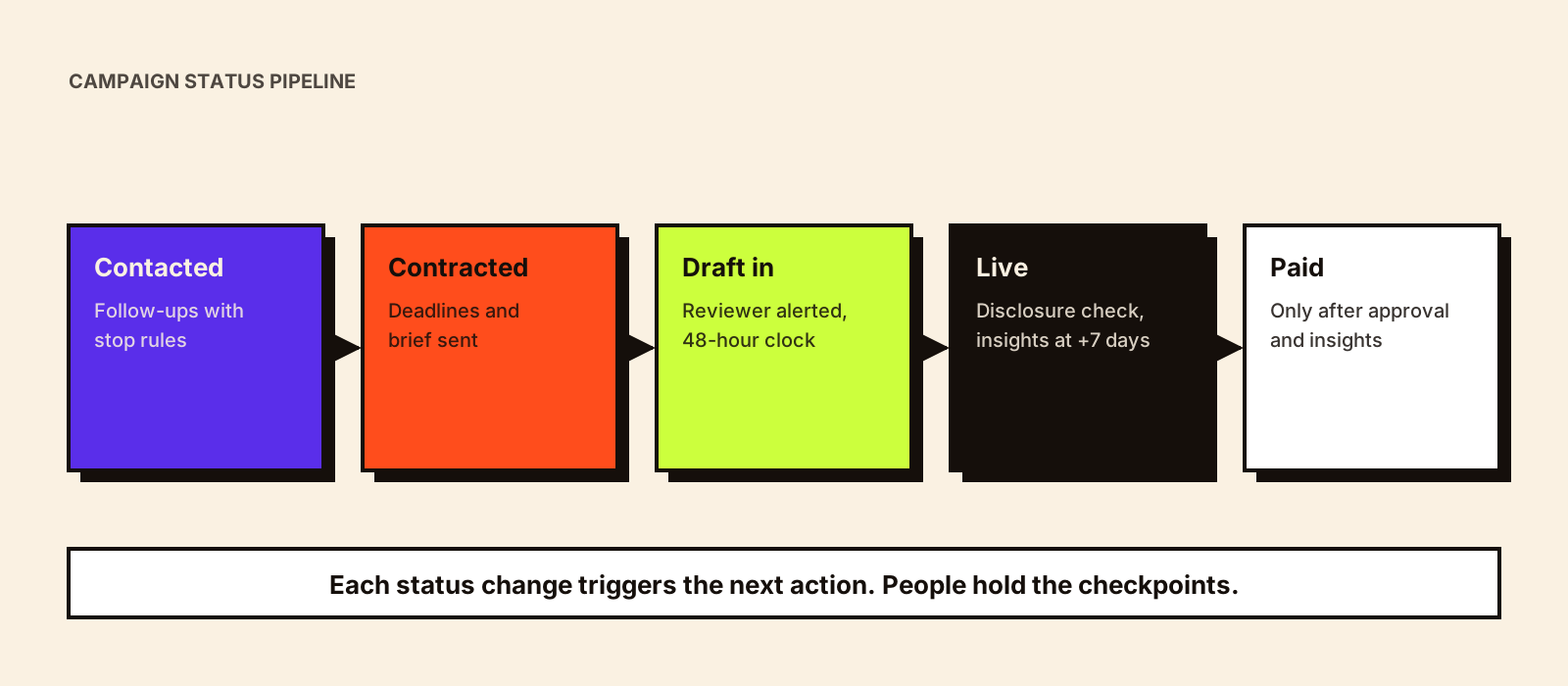
To automate an influencer campaign, first define one record per creator per campaign with fixed fields, then a status pipeline (prospect → contacted → negotiating → contracted → briefed → draft submitted → approved → live → insights received → paid). Each status change becomes a trigger for an action: send a follow-up, notify a reviewer, generate a tracking link, request insights, schedule payment, update the report. Add human checkpoints at contract, content approval and payment, and test every rule on a dummy record before going live.
If you haven't decided which tasks should be automated at all, start with influencer marketing automation.
Step 1: Get the data model right
Automations act on fields. If the fields are missing or inconsistent, the automations misfire. You need two linked records.
| Record | Key fields |
|---|---|
| Creator (one per person) | Name, handles per platform, primary language(s), city/state, category, tier, contact email, WhatsApp, manager name and contact, GST status, past campaigns |
| Campaign participation (one per creator per campaign) | Status, fee, deliverables, deadlines (draft, go-live), contract link, brief version, tracking link, discount code, draft link(s), approval date, live URL, insights (with date), invoice, payment date |
Keeping creators separate from campaign participation means a creator's history builds up across campaigns, which is the foundation of an influencer marketing CRM.
Step 2: Define a status pipeline
1. Prospect
2. Contacted
3. Negotiating
4. Contracted  ← human checkpoint (terms)
5. Briefed
6. Draft submitted
7. Changes requested  (loops back to 6)
8. Approved  ← human checkpoint (content and claims)
9. Live
10. Insights received
11. Payment approved  ← human checkpoint (amount and deliverables)
12. Paid
Side statuses: Declined · On hold · Dropped
Every status must have one clear meaning and one owner. 'In progress' is not a status.
Step 3: Build trigger-action workflows
Outreach
| Trigger | Action | Guardrail |
|---|---|---|
| Status → Contacted | Log date; schedule follow-up 1 at +4 days | Cancel if any reply logged on any channel |
| No reply at +4 days | Send short follow-up 1 (personalised template) | Only if no reply; max two follow-ups |
| No reply at +10 days | Send follow-up 2, then mark 'Declined – no response' | Notify owner before closing |
| Reply received | Move to Negotiating; assign owner; stop sequence |
The outreach stage has its own considerations (channels, personalisation, managers); see influencer outreach automation.
Contract and brief
| Trigger | Action | Guardrail |
|---|---|---|
| Fee and deliverables agreed | Generate contract from template using deal fields | Non-standard terms flagged for legal review |
| Contract signed | Status → Contracted; create draft and go-live deadlines; send brief | Brief version recorded on the record |
| Brief sent | Status → Briefed; reminder to creator 3 days before draft due |
What the contract template should contain is covered in influencer marketing contract.
Approvals
| Trigger | Action | Guardrail |
|---|---|---|
| Draft link added | Status → Draft submitted; notify reviewer; start 48-hour review clock | Reviewer named on campaign |
| Review clock at 36 hours | Remind reviewer; at 48 hours escalate to campaign lead | Prevents approvals stalling |
| Changes requested | Send feedback to creator; new deadline; count revision rounds | Alert when rounds exceed contract limit |
| Approved | Record approver and date; send go-live confirmation with link and code | Approval cannot be set by automation |
Approval delays are one of the most common reasons campaigns slip. Influencer marketing governance includes an approval workflow designed to avoid them.
Go-live, insights and payment
| Trigger | Action | Guardrail |
|---|---|---|
| Go-live date reached | Ask creator for live URL if not logged | |
| Live URL added | Status → Live; task: check disclosure label and link; schedule insights request at +7 days | Disclosure check done by a person |
| +7 days | Request insights screenshots or connected-account data | Reminder at +10 days |
| Insights received | Log figures with capture date; status → Insights received | Spot-check extracted numbers |
| Insights received + content approved | Create payment approval task with contract amount | Finance approves; amount from contract field |
| Payment approved | Schedule payment; notify creator of date | Status → Paid when confirmed |
Reporting
If every participation record carries the same performance fields, the report can assemble itself: a live table per creator (cost, views, engagements, clicks, conversions, CPM, CPE, CPA) and a campaign summary that updates as insights arrive. The analyst's job becomes interpretation rather than copy-paste. Influencer marketing report covers the structure, and influencer marketing dashboard covers the live view.
Step 4: Test before you trust
- Create a dummy creator and campaign, and walk it through every status, checking each action fires once and only once.
- Test the stop rules: log a reply and confirm follow-ups cancel.
- Test edge cases: a creator with no email, a manager handling three creators, a draft submitted twice.
- Run the first live campaign with automations sending to the team only, then switch on creator-facing messages.
- Name an owner for the exceptions queue.
What tools can run these workflows
You can build these workflows in three ways: inside dedicated influencer campaign management software, in a general database or project tool with built-in automations, or with a spreadsheet plus an automation service connecting it to email and messaging. The right choice depends on volume, how many people need access and whether you need creator-facing portals. Influencer campaign management software compares the options.
Example: a 25-creator festival campaign
Illustrative example: a fashion label runs a Diwali campaign with 25 creators across Instagram and YouTube, with go-live dates spread over two weeks. The automations that matter most here are deadline-based, because festival content posted late is wasted:
- Go-live dates set at contract; drafts due 7 days before each go-live, so there's time for one revision round.
- Reviewer reminders at 24 hours, escalation at 36, because a two-day delay compresses the festival window.
- A daily 'at risk' list: creators whose draft is due within 3 days and not yet submitted.
- Automatic go-live reminders to creators the evening before, with link, code and disclosure requirement.
- Insights requests timed to each creator's post date, not the campaign end, so all creators are compared at the same number of days.
Lead times for festival campaigns are covered in seasonal influencer marketing in India.
Naming conventions that keep automations reliable
Campaign name: YYYY-MM_brand_campaign (2026-10_brand_diwali)
UTM: utm_source=creatorhandle · utm_medium=influencer · utm_campaign=campaign name
Discount code: CREATORNAME + campaign suffix, max 12 characters
Files: campaign_creatorhandle_deliverable_v1
Statuses: exactly as in the pipeline; no free-text statuses
Dates: one format everywhere (YYYY-MM-DD)
Consistent names make tracking links join correctly to creator records in analytics, which is what lets the report assemble itself.
Adding AI on top
Once rules are working, AI can take on the reading and writing around them: drafting creator-specific briefs, summarising long threads, pre-checking drafts against the brief and drafting the report narrative. Add it after the rule-based workflow is stable, not before; AI on top of messy data produces confident-sounding mistakes. AI influencer campaign management covers those uses.
Common mistakes
- Too many statuses, so nobody updates them and automations stop firing.
- Automated creator messages that sound like system notifications.
- No limit on revision rounds, so drafts loop forever.
- Payment triggered by 'live' instead of 'approved and insights received'.
- Reports that pull in-progress numbers without showing the capture date.
The payment stages above are covered in more depth in creator payment tracking, and the setup steps before the brief in influencer onboarding.
The status pipeline above is the backbone of a campaign tracker; influencer campaign tracker covers columns, views and flags in detail.
Conclusion
Campaign automation is mostly careful data design: one record per creator per campaign, a clear status pipeline and simple trigger-action rules with stop conditions and human checkpoints. Build it once, test it on a dummy campaign and every subsequent campaign runs with less chasing. For the full manual process this automates, see how influencer campaign management works.